
GPT-6.1 Terra vs Sol: A Five-Shot Launch Storyboard Scorecard
Compare GPT-6.1 Terra vs Sol as external planning assistants with a reusable scorecard for continuity, camera direction, and claims in a 15-second product launch concept.
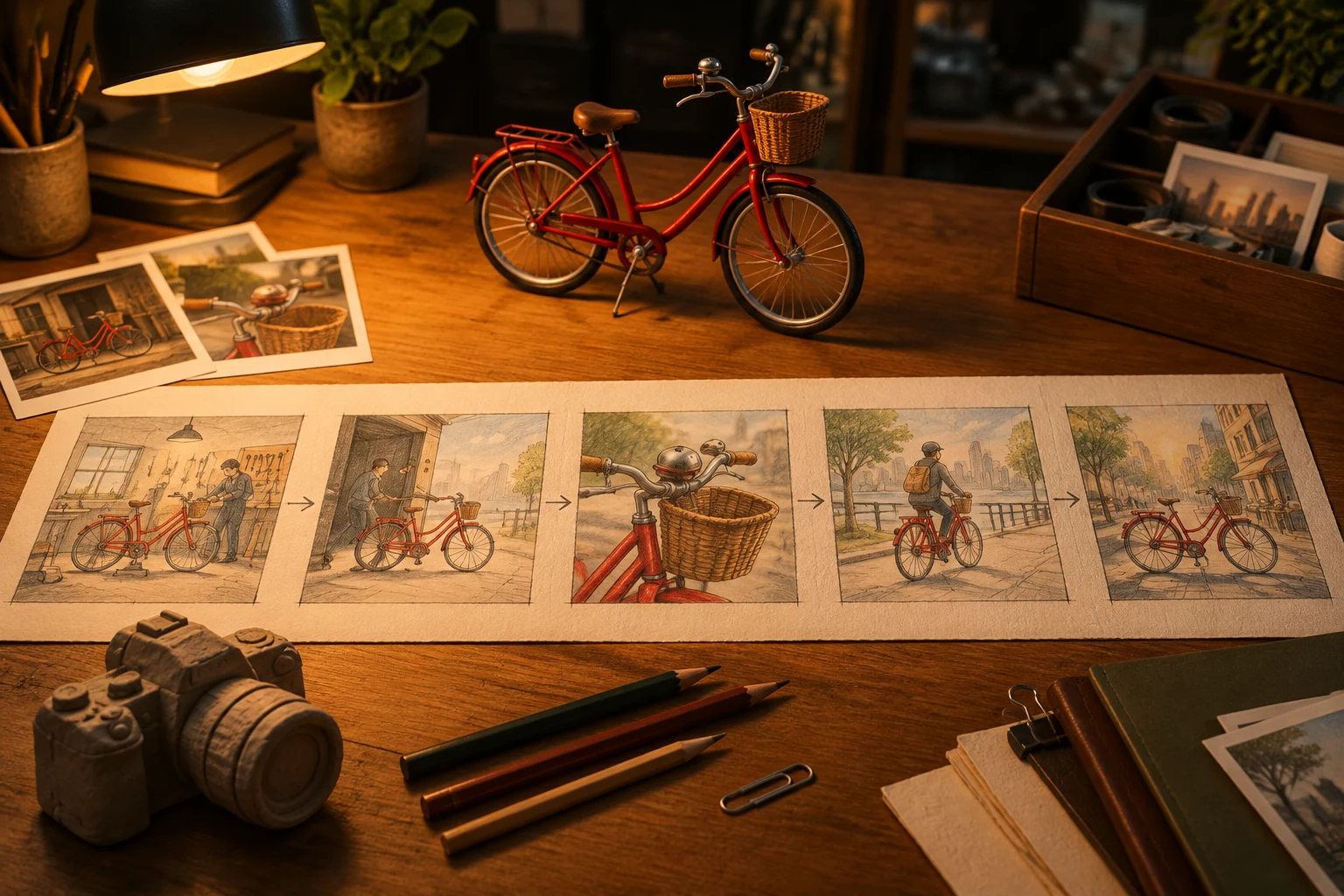
GPT-6.1 Terra vs Sol is a choice between two text-based planning assistants—not two video generators. For a 15-second product launch concept, use either to draft and audit five connected shots, then judge the proposed plan against the same continuity, camera-direction, and claims checklist. The scorecard below is a proposed evaluation, not a report of tests: no benchmark or latency results were independently measured for this article. Both models accept text and images and produce text; neither is a native image or video generation endpoint. (Terra model page, Sol model page)
What's new on this page
- 2026-11-13 — Page published. Added a reusable five-shot storyboard brief and pass/fail scorecard for checking continuity, camera direction, and product claims.
The job: a coherent launch in 15 seconds
Use one consistent hypothetical product throughout: a red commuter bicycle. The goal is a short launch concept with five shots, each assigned three seconds. Keep the location simple—a bright workshop opening onto a quiet street—and make the bicycle’s red frame, front basket, and silver bell the visual anchors. These details are scenario inputs for your prompt, not claims about a real product.
Give the assistant a fixed brief: “Create five sequential, three-second shot descriptions for a 15-second launch concept. Preserve the bicycle’s appearance and the rider’s wardrobe. Specify each shot’s framing, camera movement, screen direction, action, and transition. Include only the supplied product facts; flag any missing information instead of inventing a claim.” Ask for a shot list in a table, then run the scorecard below on the result.
Terra is positioned for visual reasoning, clear writing, and bounded computer-use tasks. Sol is positioned for complex coding, computer use, and professional workflows. Those descriptions may help you form a hypothesis about fit, but they do not establish which will produce the stronger storyboard. The official model-selection guidance recommends comparing representative work with the same inputs and settings. (Terra, Sol, model-selection guide)
Reusable five-shot brief
Keep the action and screen direction explicit so you can check whether one shot leads logically into the next.
| Shot | Time | Intended action and direction | Continuity question |
|---|---|---|---|
| 1 | 0–3 sec | Establish the workshop. The bicycle stands on the right; the rider enters from the left and looks toward it. | Are bicycle color, accessories, and rider appearance established? |
| 2 | 3–6 sec | Move closer as the rider reaches for the handlebars. Keep the bicycle oriented toward the open street. | Does the approach preserve the bicycle’s position and orientation? |
| 3 | 6–9 sec | Follow the rider pushing the bicycle out of the workshop toward the right. | Does the camera movement support the same direction of travel? |
| 4 | 9–12 sec | Show the rider mounting and beginning to ride on the street, moving right. | Is the transition from pushing to riding physically and spatially clear? |
| 5 | 12–15 sec | End with a wider moving shot of the rider continuing right, with room for a closing product line. | Does the final shot resolve the journey without adding unsupported claims? |
This is a planning scaffold, not a prescribed finished film. Change the setting or action if your project requires it, but keep the five-shot timing and define a clear direction before comparing outputs. For a visual concept, you can take the resulting plan into Kling AI image tools or Kling AI video tools; their availability does not mean Terra or Sol is available inside those tools.
Pass/fail scorecard
Mark each check Pass only when the output states enough detail to verify it. Otherwise mark Fail and ask for a targeted revision. A polished-sounding answer does not earn a pass by itself.
- Timing: Five shots are listed, and their durations total exactly 15 seconds. Pass: the table shows three seconds per shot, or another explicit set that totals 15. Fail: timing is missing, contradictory, or adds up to a different runtime.
- Product identity: The bicycle remains red and retains the same named details wherever shown. Pass: later shots do not silently remove, replace, or add defining features. Fail: the basket, bell, color, or other fixed detail changes without a requested reason.
- Rider continuity: The rider’s wardrobe and role remain consistent. Pass: the same rider performs the sequence. Fail: a new rider appears, or clothing changes without an intentional transition.
- Screen direction: The plan identifies the bicycle’s orientation and direction of travel. Pass: movement stays rightward across the workshop exit and street sequence, or an intentional reversal is clearly motivated. Fail: left-right direction flips between shots without explanation.
- Camera direction: Each shot specifies framing and any movement in usable terms—for example, “wide, stationary” or “medium, tracking right.” Pass: camera movement is distinguishable from subject movement. Fail: “dynamic camera” is the only instruction, or a move contradicts the described action.
- Transition logic: The end of each shot gives the next shot a plausible starting state. Pass: the rider reaches the handlebars before pushing, and pushes before mounting. Fail: the sequence skips, reverses, or repeats an action without direction.
- Claims discipline: Product statements are limited to supplied facts. Pass: missing performance, safety, or materials information is flagged for verification. Fail: the assistant invents a range, speed, certification, price, or superlative.
- Usability: A creator could revise or hand off the list without guessing about timing, action, or direction. Pass: all five rows contain those essentials. Fail: multiple rows rely on vague phrases such as “show the bike beautifully.”
Count the passes, but also record every failure by category. A high total cannot cancel a factual-claim failure: remove or verify unsupported copy before production. Rerun a revised prompt with the same scenario, output format, and settings when comparing assistants. Keep your brief and scorecard together so the review is repeatable.
Cost: compare the stated text rates carefully
The following are standard text token rates per million USD, not site credits. Cache writes, tools, modes, and long prompts can change bills, and equal token counts do not imply equal task cost. Rates are from the official Terra page and official Sol page.
| Model | Input / 1M tokens | Cached input / 1M tokens | Output / 1M tokens |
|---|---|---|---|
| Terra | $1 | $0.05 | $5 |
| Sol | $2 | $0.10 | $10 |
For a narrow illustration of the arithmetic, 1,000 input tokens plus 500 output tokens at the listed standard rates would be $0.0035 for Terra ($0.001 input + $0.0025 output) and $0.007 for Sol ($0.002 input + $0.005 output). This equal-token example excludes caching, tools, and other billing factors; it is not a quote for your task or a statement about Kling AI credits. See Kling AI pricing for site pricing information.
Make the choice with a small, fair review
Do not select from model descriptions or token rates alone. Submit the same bicycle brief and requested table format to each model, then apply the eight checks without changing the scenario to favor one response. If one draft fails a check, give it the same focused revision instruction and score the revised draft separately. This is a proposed way to evaluate your own workflow, not an actual model test or a claim about which model wins.
Decision rule: choose the assistant whose draft passes your essential continuity, camera, and claims checks with the least revision; if neither does, tighten the brief and compare again. Then move the approved plan into your chosen visual workflow, and browse the Kling AI blog for more creator guidance.