
Claude Fable 5.2 vs 5.1: Keep the Suitcase Handoff on Track
Claude Fable 5.2 vs 5.1 for rewriting a three-shot plan: compare continuity, screen direction, and when to keep your current workflow.
What's new on this page
- — Page published.
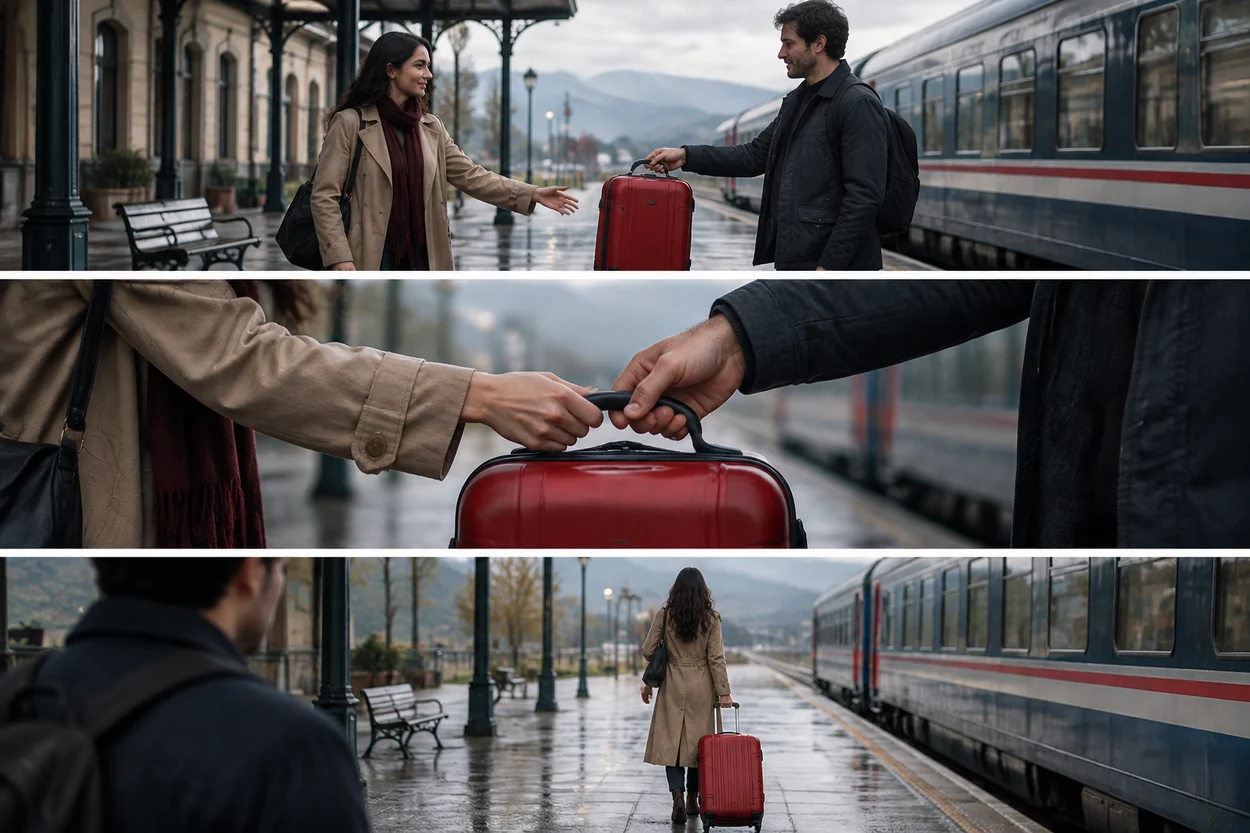
When a three-shot sequence depends on a red suitcase changing hands without crossing the frame’s established direction, the better rewrite is the one that preserves those constraints—not the one that sounds more cinematic. For this planning task, try Claude Fable 5.2 when you want a fresh rewrite under a tightly specified brief; try 5.1 if it is already giving you usable, predictable plans and you need no change to the workflow. Neither version replaces your downstream image or video tool, and a model name alone cannot guarantee continuity.
Set up a continuity test
Use one short scene with three shots. A traveler stands on the left and a courier on the right. The traveler passes a red suitcase to the courier. Keep the camera on the same side of their eyeline in all three shots, so the traveler remains frame-left and the courier frame-right. The handoff must begin in shot two and finish there; shot three shows the courier leaving with the same suitcase. No cutaway, reverse angle, extra prop, or unexplained change of hands.
This is deliberately narrow. A rewrite can sound polished while quietly reversing the screen direction, completing the handoff offscreen, or introducing a second red bag. Your comparison should make those failures visible. Treat both Claude versions as text-planning options. After choosing a plan, you can take it into a separate image or video workflow, such as the Kling AI video generator, but that tool is not the model being compared here.
Copyable brief
Paste the same brief into each version, changing only the model. Ask for a rewrite rather than adding extra requests mid-test.
Rewrite this three-shot plan for a short visual sequence. Preserve every continuity constraint and return exactly three numbered shots. Each shot must state camera framing, screen position, visible action, and suitcase status.
Fixed geography: The traveler stays frame-left; the courier stays frame-right. Keep the camera on the same side of their eyeline in all three shots. Do not reverse screen direction or change the axis.
Prop continuity: There is one red suitcase. It begins with the traveler. The traveler starts handing it to the courier in shot 2, and the transfer finishes on camera in shot 2. The courier carries that same suitcase in shot 3.
Required beats: Shot 1 establishes both people and the suitcase. Shot 2 shows the complete handoff. Shot 3 shows the courier departing with the suitcase. Do not add characters, props, shots, cutaways, or offscreen action. Keep each shot concise. If a requested detail is unspecified, do not invent it.
Before the shot list, state any continuity assumption you had to make. After it, list the fixed screen-direction and suitcase facts you preserved.
The final two requests are useful checks, not proof that the rewrite is correct. Inspect the shot list itself: a model can state the right rule in its summary and still violate it in a shot. If the original plan already specifies framing or movement, include those facts in the brief rather than letting either model improvise.
Compare the rewrites, not the reputation
For each version, mark five checks: exactly three shots; traveler stays left and courier right; the suitcase starts with the traveler; the full transfer is visible in shot two; and the courier leaves with the same suitcase in shot three. Record any invented detail separately. This makes the comparison about the production problem you actually have, rather than a general impression of fluency.
For example, the following is hypothetical phrasing, not a claim about either model’s output: “Shot 2: In a medium two-shot from the established side of the axis, the traveler on frame-left extends the red suitcase to the courier on frame-right. The courier takes its handle; the traveler releases it before the shot ends.” It makes the transfer observable and keeps the geography explicit. A phrase such as “they exchange the bag” is less useful because it does not say who holds it at the end of the shot.
Also watch for subtle continuity drift. “The courier turns toward the street” may be fine if the direction is specified, but it could invite a reverse angle in a later image or video prompt. “The traveler steps aside” adds movement that may complicate the established frame. If either version adds such details, decide whether they are harmless creative choices or new constraints your production would need to resolve. Do not reward decorative language that makes the plan harder to execute.
Choose with a practical tie-breaker
Use this decision rule: reject any rewrite that breaks a fixed constraint; among the remaining rewrites, choose the one with fewer unsupported details. If both pass and add the same number of assumptions, choose the one that states suitcase ownership at the end of every shot most clearly. That is the meaningful tie-breaker here because the handoff is the sequence’s vulnerable beat. If neither passes, keep the original shot plan and revise the brief to identify the missed constraint before trying again.
Try 5.2 first if you are making a new comparison and want to see whether it can produce a clean rewrite under the same compact brief. Keep using 5.1 if it already preserves your continuity rules and the new version offers no practical improvement in your review. The official Claude Fable model-family page lists rates of $8 per million input tokens and $40 per million output tokens for 5.2, versus $10 and $50 for 5.1. Those rates may matter to a broader workflow decision, but they do not decide which rewrite handles this suitcase handoff better.
Save the selected plan with its continuity notes, then carry those notes into the separate image or video stage. Review the generated shots for left-right positions, the visible transfer, and the suitcase’s identity. A text rewrite can clarify the plan; the production check still belongs to the person approving the sequence.