
ChatGPT Empty Room: Plan a Personal Scene with Objects You Choose
Use ChatGPT Empty Room prompts to plan a readable room scene with chosen interests, clear foreground-to-background blocking, and an optional clip.
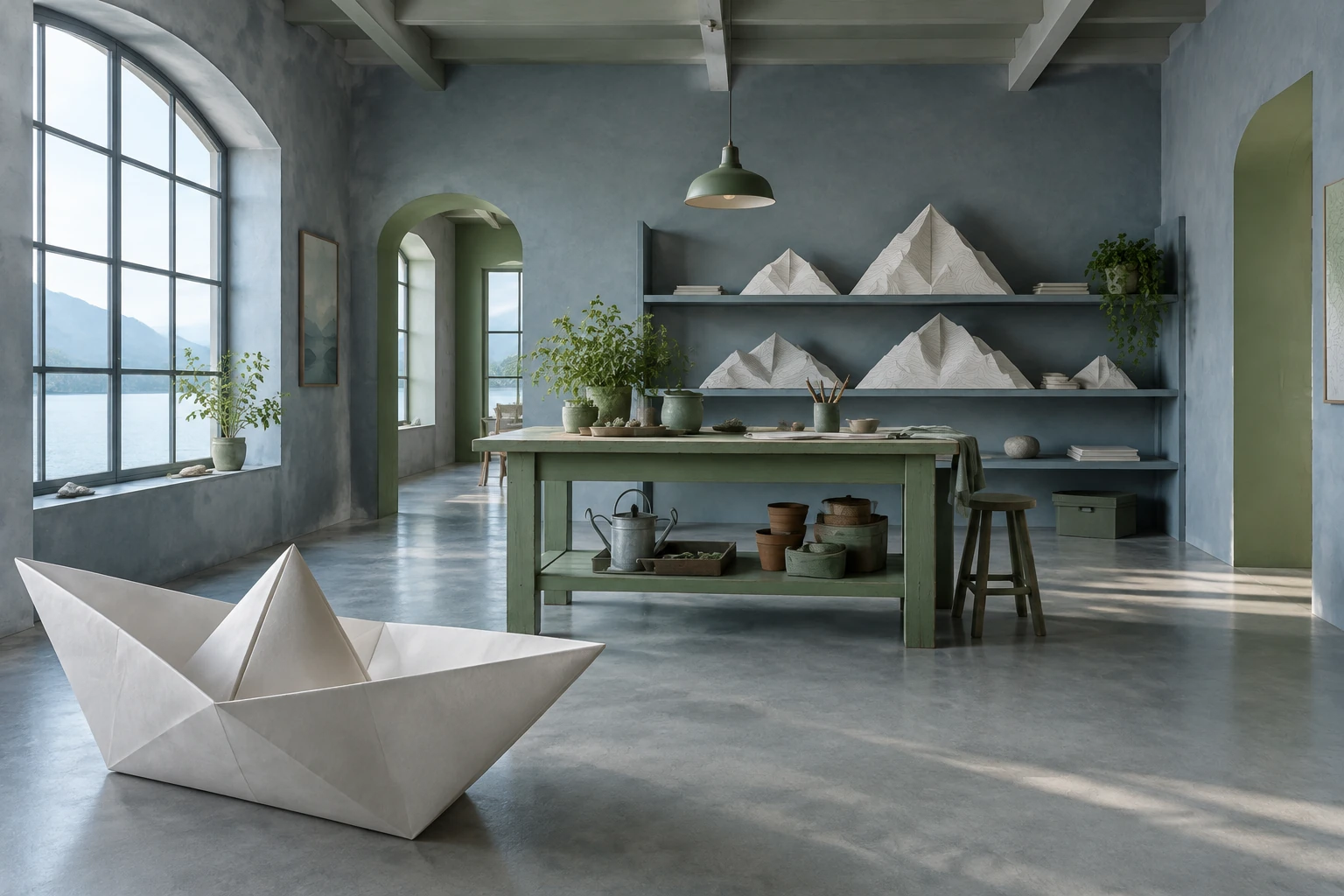
A ChatGPT Empty Room prompt can turn interests you choose to share into a readable imaginary room—not a personality reading. This guide builds a finished still image around gardening, map collecting, and paper boats. You’ll get a reusable blocking sheet, a complete image prompt, and a clearly optional idea for a separate short clip.
What's new on this page
- 2026-11-13 — Published this guide with an original foreground/middle/background room-blocking worksheet and a complete prompt for a fictional gardener, map collector, and paper-boat maker.
Start with objects, not a personality guess
Treat the room as a creative prompt game. You supply the interests; you decide what they look like as objects. The scene should communicate through visible choices: a potting table suggests gardening, folded map sheets suggest collecting, and a paper boat suggests making things by hand. None of those details needs to imply anything about the fictional person’s character or private life.
A blank-room setup is useful because it gives you space to decide what belongs in the image before adding style. First make the architecture legible, then place a small number of meaningful objects. A finished room image needs a focal point and a clear path for the eye—not a pile of props.
What the official guidance supports
OpenAI’s image-generation guide covers requesting images and using reference images. Its memory guidance explains memory settings; provide the details needed for this scene instead of assuming remembered context. (Image generation; Memory customization.)
The prompts below are original visual guidance. If you switch tools, carry over the complete brief: don’t assume one tool can access another tool’s conversation or memory.
Room-blocking worksheet
Use this sheet before writing a prompt. Keep each zone visually distinct, and protect the floor so the scene doesn’t feel crowded.
| Depth | Place in the scene | What the viewer should notice |
|---|---|---|
| Foreground | One oversized paper boat on the clear floor, slightly off center. | The crisp folded-paper shape is the dominant object and leads the eye into the room. Leave open floor around it. |
| Middle ground | A green potting table with one potted plant, a small trowel, and a few seed packets. | This is the gardening area. Keep the tabletop orderly; don’t add a second focal point. |
| Background | A low rear shelf with a few folded, blank topographic paper forms. | Their contour lines signal map collecting without readable labels, tiny text, or a distracting gallery wall. |
| Room structure | Two visible walls meeting at a corner, a simple window, and a continuous floor. | The viewer can identify the room and see how the objects sit within it. Keep the walls mostly quiet. |
| Light and palette | Soft daylight; blue-gray walls, pale green accents, natural paper tones. | Gentle contrast separates the boat, table, and shelf while preserving a calm, finished scene. |
Quick composition test: Can you point out the room, the boat, the gardening area, and the map shelf at a glance? If not, remove a prop or strengthen the separation between zones.
Complete still-image prompt
Use this as a self-contained brief in ChatGPT or an image-generation tool that accepts a standalone prompt. Edit the room details to suit your idea; the result you’re asking for is a finished personal scene, not an empty room waiting for later edits.
Create a finished editorial illustration of an imaginary, quiet room belonging to a fictional person who gardens, collects maps, and makes paper boats. Show two clearly visible blue-gray walls meeting at a corner, one simple window, and a continuous floor that remains mostly clear. Compose the scene in three readable depth zones: in the foreground, place one oversized folded paper boat on the open floor, slightly off center; in the middle ground, place a tidy green potting table with one leafy potted plant, a small hand trowel, and a few seed packets; in the background, place a low shelf holding a small collection of folded blank topographic paper forms. Make the paper boat the single dominant object. Keep the walls uncluttered, the floor unobstructed, and each zone easy to distinguish. Use soft daylight, restrained blue-gray and pale green colors, natural paper textures, a calm wide view, and clear editorial composition. Make the room feel complete and personal through these voluntarily supplied interests. No people, text, labels, logos, extra focal objects, or scattered clutter.
For a reference-image workflow, you may supply one room photo you own and state what should remain in place—for example, the visible window and floor. Ask for an interpretation that uses those features, not an exact reconstruction. Don’t include private documents or people in the photo. If you’re moving the brief to klingai.me, paste it in as a standalone prompt rather than expecting imported conversation context. Start with Kling AI image generation.
Optional: plan a separate short clip
The still is complete on its own. If you also want motion, make that a separate task: use the finished image as your visual starting point and request only a restrained moment, such as a small shift of daylight across the floor while the paper boat and room remain visually calm. Keep the intended movement modest and specify what should stay still. This is a concept, not a guarantee of exact motion or camera behavior.
This site’s AI video creation is an optional next step using whichever model and input mode you select in the current interface. Bring a concise visual brief into that task; don’t treat the image prompt as an automatic video edit. Before any paid task, check the current model and quoted cost in the product interface. No price or amount is assumed here.
Accept-or-revise checklist
Review the still before you add anything—or decide whether to make a separate clip:
- Visible walls: Can you see the room’s walls and understand its layout? If not, simplify the viewpoint or move tall objects away from the corner.
- Clear floor: Is there open floor around the boat and between the viewer and table? If clutter fills it, remove loose props.
- One dominant object: Does the oversized paper boat read first? If the plant or shelf competes, reduce its size, contrast, or detail.
- Distinct depth: Are foreground, middle ground, and background easy to separate? If not, adjust spacing, light, or overlap in the prompt.
- Interests shown by chosen objects: Do the plant, map forms, and boat communicate the supplied brief without extra symbolic claims? Keep only the objects that help.
- Quiet movement, if making a clip: Is there one modest movement, with the main objects described as still? If you want the image to remain your final piece, skip video entirely.
Revise by naming the visible issue and the change you want: “Keep the paper boat as the only focal object; clear the floor around it.” Then generate or edit as the current tool allows. For more prompt ideas, browse the Kling AI blog; check pricing only when you’re considering a paid task.