Planifica ediciones de imagen enfocadas con Nano Banana 2
Explica tu sujeto, cambios y referencias
Enumera los detalles que importan en tu brief de imagen de Nano Banana 2: identidad, forma, colores, vestimenta y fondo. Usa referencias compatibles cuando corresponda y compara cada resultado; no se garantiza una consistencia exacta.

Prompt verificado
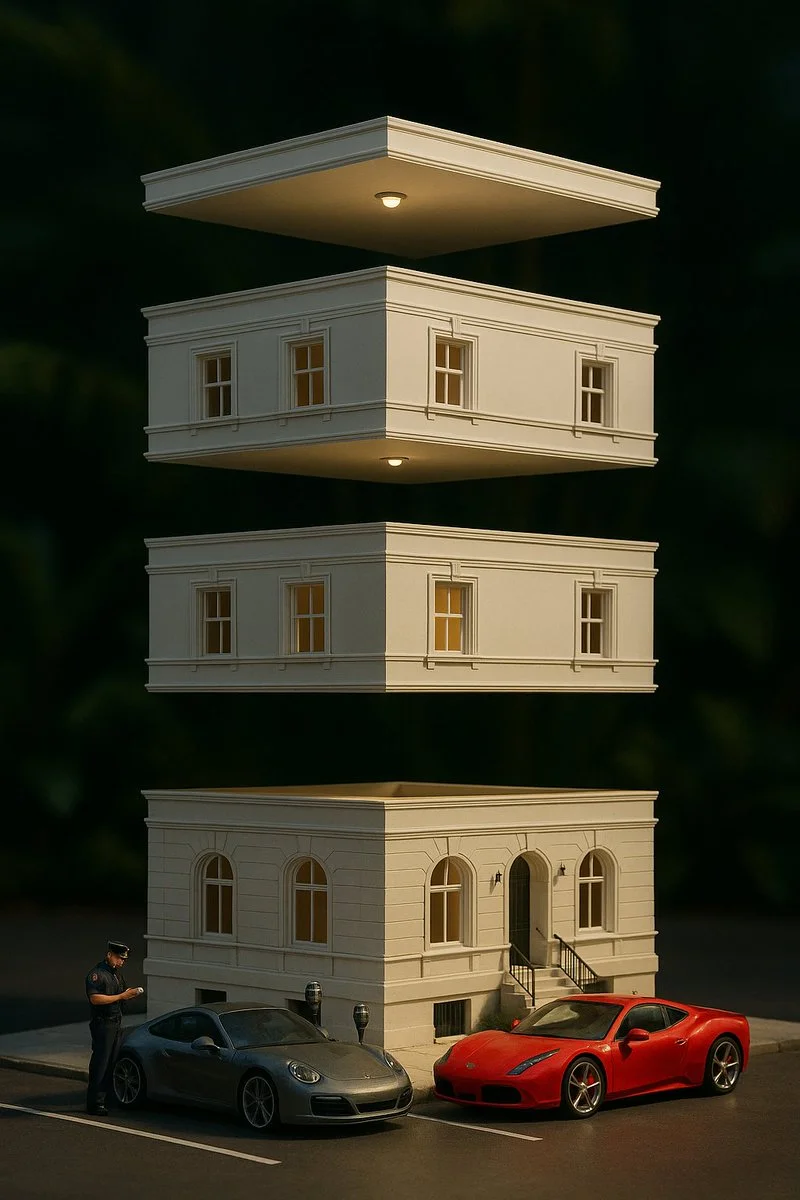
A hyper-realistic photograph of a [FRUIT] sliced into five glossy layers, each slice floating vertically in mid-air with glistening juice droplets at the edges. The slices cast soft, natural shadows on each other. The [FRUIT] has a vibrant skin with appropriate interior details .Set against a softly blurred tropical garden background with hints of lush green leaves and dappled sunlight, the scene is lit with warm, directional golden-hour lighting, enhancing the vivid colors and depth
A hyper-realistic photograph of a [FRUIT] sliced into five glossy layers, each slice floating vertically in mid-air with glistening juice droplets at the edges. The slices cast soft, natural shadows on each other. The [FRUIT] has a vibrant skin with appropriate interior details .Set against a softly blurred tropical garden background with hints of lush green leaves and dappled sunlight, the scene is lit with warm, directional golden-hour lighting, enhancing the vivid colors and depth
Prompt verificado
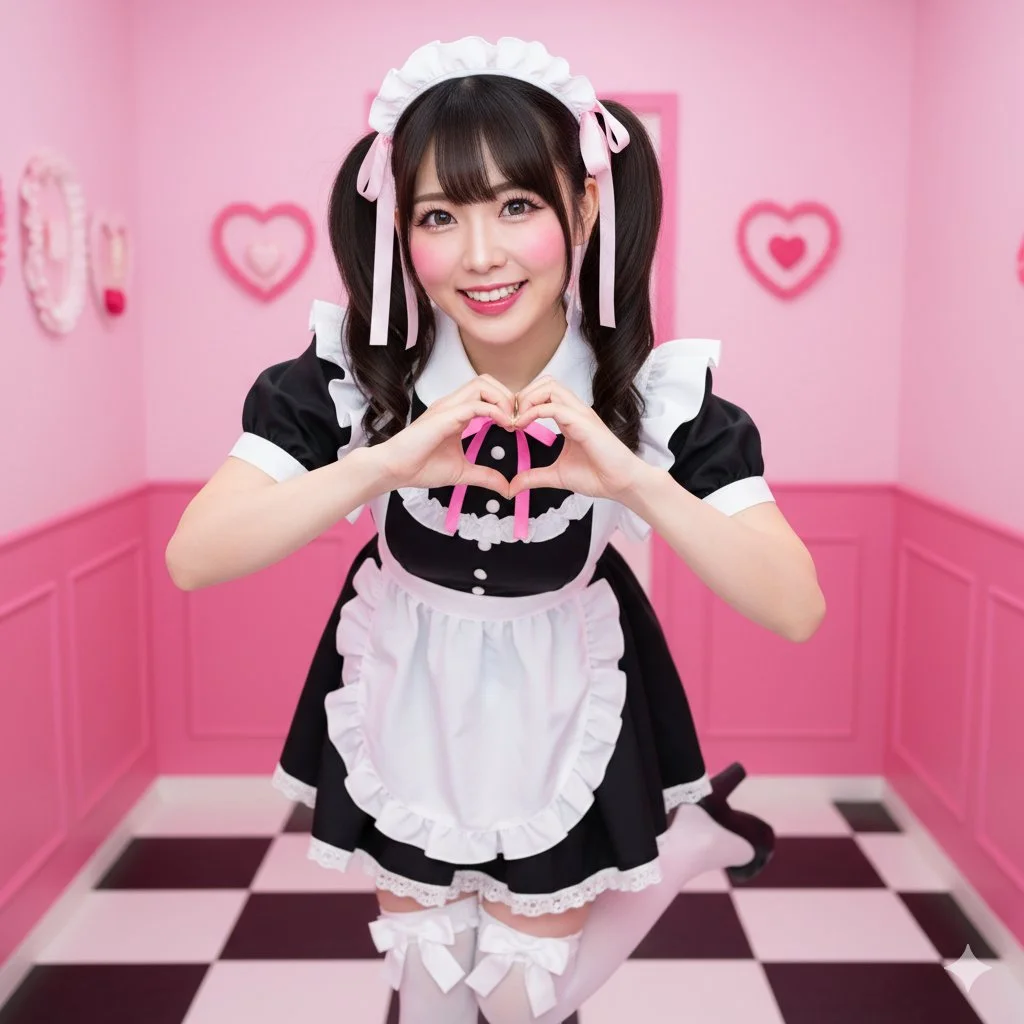
{ "scene": { "location": "Themed 'Maid Cafe' interior, focused and clean", "background": "Bright pink walls, checkered floor, subtle hearts and ruffle decorations (soft focus, no distracting elements)" }, "subject": { "age": "adult", "description": "Realistic East Asian woman, dark hair in high twin-tails with ribbons, sparkling, energetic eyes", "wardrobe": "Classic black maid dress with a short skirt, pristine white frilly apron, knee-high white socks with bows", "accessories": "Frilly maid headband, ribbons in hair", "pose": "Full body, dynamic 'moe moe kyun' pose; both hands making a heart gesture, one foot popped, slight bow", "expression": "Extremely energetic, wide-eyed 'kawaii' smile, 'genki' (energetic) personality", "gaze": "Direct to camera, engaging and cheerful", "body_notes": "realistic adult proportions; natural skin texture" }, "camera": { "sensor": "full_frame", "focal_length_mm": 35, "aperture_f": 2.8, "shutter_s": 0.008, "iso": 400, "white_balance_k": 5000, "distance_m": 3.0, "camera_height_m": 1.0, "framing": "Full body shot, slightly low angle to enhance cuteness and energy", "focus": "eye_detect_AF on nearest eye" }, "lighting": { "key": "Bright, even, slightly flat studio lighting (simulating cafe interior)", "fill": "Large softboxes from both sides to eliminate shadows", "hair": "Top-down rim light to separate hair", "catchlights": "Multiple, large, bright catchlights", "notes": "Very bright, 'pop' lighting, high-key" }, "color_grade": { "style": "Akihabara-pop, vibrant", "palette": "Bright pink, black, white; clear, bright skin", "contrast": "Medium, very clean and crisp", "saturation": "High saturation" }, "makeup": { "eyes": "Emphasized 'anime' eyes, prominent aegyo-sal, long upper and lower lashes", "cheeks": "Bright pink, circular blush", "lips": "High-gloss pink or red lip tint" }, "postprocess": { "retouch": "Clean skin retouching, "idol" level", "clarity": "High clarity on eyes, apron ruffles, and hair", "dodge_burn": "Dodge on eyes to make them sparkle", "vignette": "None" }, "art_direction": { "mood": "Energetic, cheerful, adorable, welcoming", "keywords": ["maid cafe", "moe", "kawaii", "twin-tails", "heart gesture", "Akihabara"] }, "negative_prompts": [ "nsfw", "underage look", "text or logos", "plastic doll skin", "warped hands or extra fingers", "deformed limbs", "dark or moody", "French maid (Victorian)", "sad expression", "cluttered background", "photography equipment", "lighting equipment" ] }
{ "scene": { "location": "Themed 'Maid Cafe' interior, focused and clean", "background": "Bright pink walls, checkered floor, subtle hearts and ruffle decorations (soft focus, no distracting elements)" }, "subject": { "age": "adult", "description": "Realistic East Asian woman, dark hair in high twin-tails with ribbons, sparkling, energetic eyes", "wardrobe": "Classic black maid dress with a short skirt, pristine white frilly apron, knee-high white socks with bows", "accessories": "Frilly maid headband, ribbons in hair", "pose": "Full body, dynamic 'moe moe kyun' pose; both hands making a heart gesture, one foot popped, slight bow", "expression": "Extremely energetic, wide-eyed 'kawaii' smile, 'genki' (energetic) personality", "gaze": "Direct to camera, engaging and cheerful", "body_notes": "realistic adult proportions; natural skin texture" }, "camera": { "sensor": "full_frame", "focal_length_mm": 35, "aperture_f": 2.8, "shutter_s": 0.008, "iso": 400, "white_balance_k": 5000, "distance_m": 3.0, "camera_height_m": 1.0, "framing": "Full body shot, slightly low angle to enhance cuteness and energy", "focus": "eye_detect_AF on nearest eye" }, "lighting": { "key": "Bright, even, slightly flat studio lighting (simulating cafe interior)", "fill": "Large softboxes from both sides to eliminate shadows", "hair": "Top-down rim light to separate hair", "catchlights": "Multiple, large, bright catchlights", "notes": "Very bright, 'pop' lighting, high-key" }, "color_grade": { "style": "Akihabara-pop, vibrant", "palette": "Bright pink, black, white; clear, bright skin", "contrast": "Medium, very clean and crisp", "saturation": "High saturation" }, "makeup": { "eyes": "Emphasized 'anime' eyes, prominent aegyo-sal, long upper and lower lashes", "cheeks": "Bright pink, circular blush", "lips": "High-gloss pink or red lip tint" }, "postprocess": { "retouch": "Clean skin retouching, "idol" level", "clarity": "High clarity on eyes, apron ruffles, and hair", "dodge_burn": "Dodge on eyes to make them sparkle", "vignette": "None" }, "art_direction": { "mood": "Energetic, cheerful, adorable, welcoming", "keywords": ["maid cafe", "moe", "kawaii", "twin-tails", "heart gesture", "Akihabara"] }, "negative_prompts": [ "nsfw", "underage look", "text or logos", "plastic doll skin", "warped hands or extra fingers", "deformed limbs", "dark or moody", "French maid (Victorian)", "sad expression", "cluttered background", "photography equipment", "lighting equipment" ] }
Prompt verificado
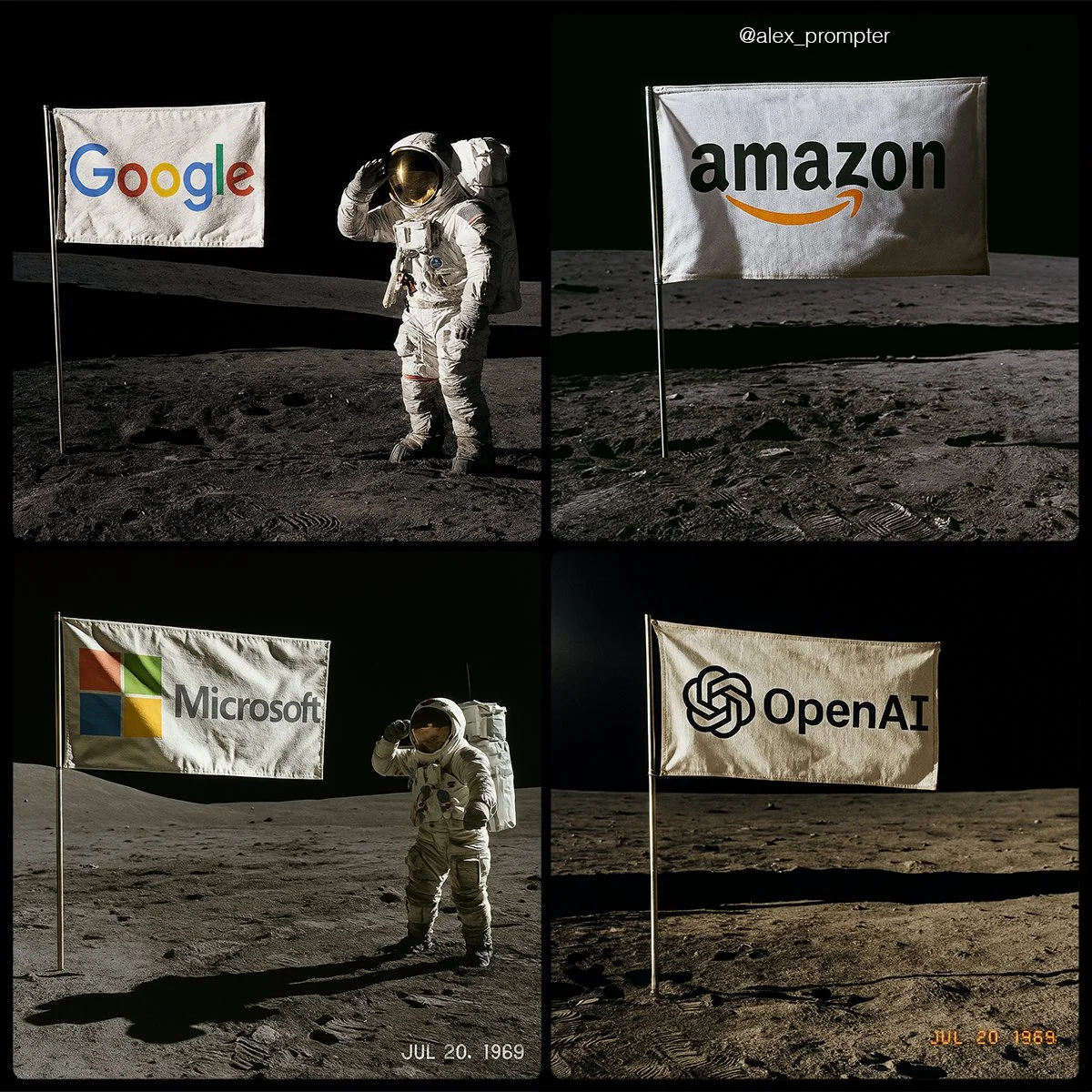
Recreate [BRAND NAME] logo following my JSON aesthetic below: { "role": "You are a lunar scene generator trained on NASA’s Apollo archives. Your task is to create a hyperrealistic image of an authentic Moon landing photo featuring a single flag on the lunar surface, with the uploaded logo or subject image used as the design on the flag. Maintain all original colors, shapes, and text. Do not alter or reinterpret the uploaded image. No substitutions allowed.", "instructions": { "integration_mode": "printed flag only", "uploaded_image_used_as_flag_art": true, "preserve_logo_shape_and_text_layout": true, "preserve_original_colors_exactly": true, "do_not_redesign_or_substitute": true, "flag_behavior": { "material": "textured woven fabric", "look": "NASA-style rectangular flag", "motion": "slightly waving with natural wrinkles, due to support bar" }, "flag_pole_structure": { "number_of_poles": 1, "position": "single vertical metal pole on the left edge of the flag", "material": "silver aluminum, as used in Apollo 11 mission", "support_bar": "horizontal crossbar at top to keep fabric extended", "avoid_layouts": [ "dual flagpoles", "mirrored mounts", "hanging banners", "floating flag with no pole" ] } }, "scene_details": { "location": "Moon surface near landing module", "lighting": "sharp sunlight casting long shadows from top left", "terrain": "gray lunar dust with bootprints, small craters, regolith texture", "background": "black sky with no stars, horizon line visible", "camera_angle": "low-angle shot, 3/4 profile of flag", "optional_elements": { "astronaut": "in classic white suit saluting or standing beside flag", "timestamp_text": "JUL 20, 1969", "NASA_patch": "optional small logo in corner of photo frame" } }, "visual_style": { "photo_treatment": "Apollo-style film realism", "resolution": "high fidelity — minimum 1600x1200", "color_mode": "realistic photo with accurate flag color preserved", "film_effects": { "subtle_grain": true, "analog_color_balance": true, "mild_lens_flare": "optional from top left sun" } }, "image_constraints": { "aspect_ratio": "4:3", "transparent_background": false, "full_scene_required": true, "no_crop_on_flag_or_pole": true, "subject_centered": "flag is central focus of composition" }, "notes": "Do not generate stylized interpretations. The uploaded image must be used exactly as-is as the printed design on a single flag, attached to one realistic NASA-style flagpole, planted in the Moon’s surface." }
Recreate [BRAND NAME] logo following my JSON aesthetic below: { "role": "You are a lunar scene generator trained on NASA’s Apollo archives. Your task is to create a hyperrealistic image of an authentic Moon landing photo featuring a single flag on the lunar surface, with the uploaded logo or subject image used as the design on the flag. Maintain all original colors, shapes, and text. Do not alter or reinterpret the uploaded image. No substitutions allowed.", "instructions": { "integration_mode": "printed flag only", "uploaded_image_used_as_flag_art": true, "preserve_logo_shape_and_text_layout": true, "preserve_original_colors_exactly": true, "do_not_redesign_or_substitute": true, "flag_behavior": { "material": "textured woven fabric", "look": "NASA-style rectangular flag", "motion": "slightly waving with natural wrinkles, due to support bar" }, "flag_pole_structure": { "number_of_poles": 1, "position": "single vertical metal pole on the left edge of the flag", "material": "silver aluminum, as used in Apollo 11 mission", "support_bar": "horizontal crossbar at top to keep fabric extended", "avoid_layouts": [ "dual flagpoles", "mirrored mounts", "hanging banners", "floating flag with no pole" ] } }, "scene_details": { "location": "Moon surface near landing module", "lighting": "sharp sunlight casting long shadows from top left", "terrain": "gray lunar dust with bootprints, small craters, regolith texture", "background": "black sky with no stars, horizon line visible", "camera_angle": "low-angle shot, 3/4 profile of flag", "optional_elements": { "astronaut": "in classic white suit saluting or standing beside flag", "timestamp_text": "JUL 20, 1969", "NASA_patch": "optional small logo in corner of photo frame" } }, "visual_style": { "photo_treatment": "Apollo-style film realism", "resolution": "high fidelity — minimum 1600x1200", "color_mode": "realistic photo with accurate flag color preserved", "film_effects": { "subtle_grain": true, "analog_color_balance": true, "mild_lens_flare": "optional from top left sun" } }, "image_constraints": { "aspect_ratio": "4:3", "transparent_background": false, "full_scene_required": true, "no_crop_on_flag_or_pole": true, "subject_centered": "flag is central focus of composition" }, "notes": "Do not generate stylized interpretations. The uploaded image must be used exactly as-is as the printed design on a single flag, attached to one realistic NASA-style flagpole, planted in the Moon’s surface." }
Prompt verificado
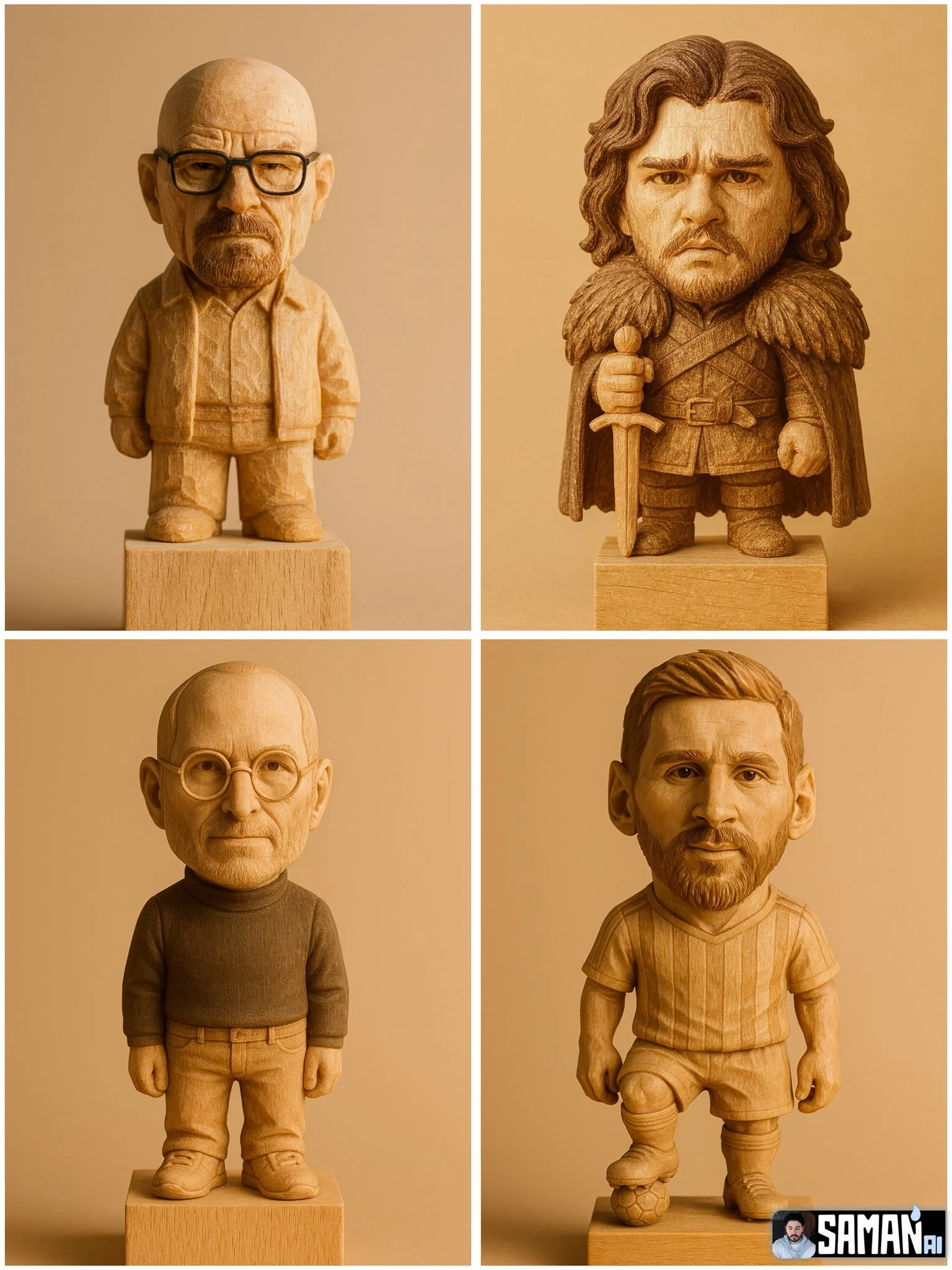
Hyper-realistic carved wooden figurine of [CHARACTER], chibi proportions (big head, short body), standing on a plain wood block. Keep key face traits and iconic [OUTFIT/PROP]. Visible wood grain and chisel marks, matte finish. Warm studio light, soft shadow, seamless beige background. Centered full-body, slight 3/4 angle, shallow depth of field (85mm look). Ultra-detailed, photoreal, warm sepia grading. Aspect ratio [3:4].
Hyper-realistic carved wooden figurine of [CHARACTER], chibi proportions (big head, short body), standing on a plain wood block. Keep key face traits and iconic [OUTFIT/PROP]. Visible wood grain and chisel marks, matte finish. Warm studio light, soft shadow, seamless beige background. Centered full-body, slight 3/4 angle, shallow depth of field (85mm look). Ultra-detailed, photoreal, warm sepia grading. Aspect ratio [3:4].
Prompt verificado
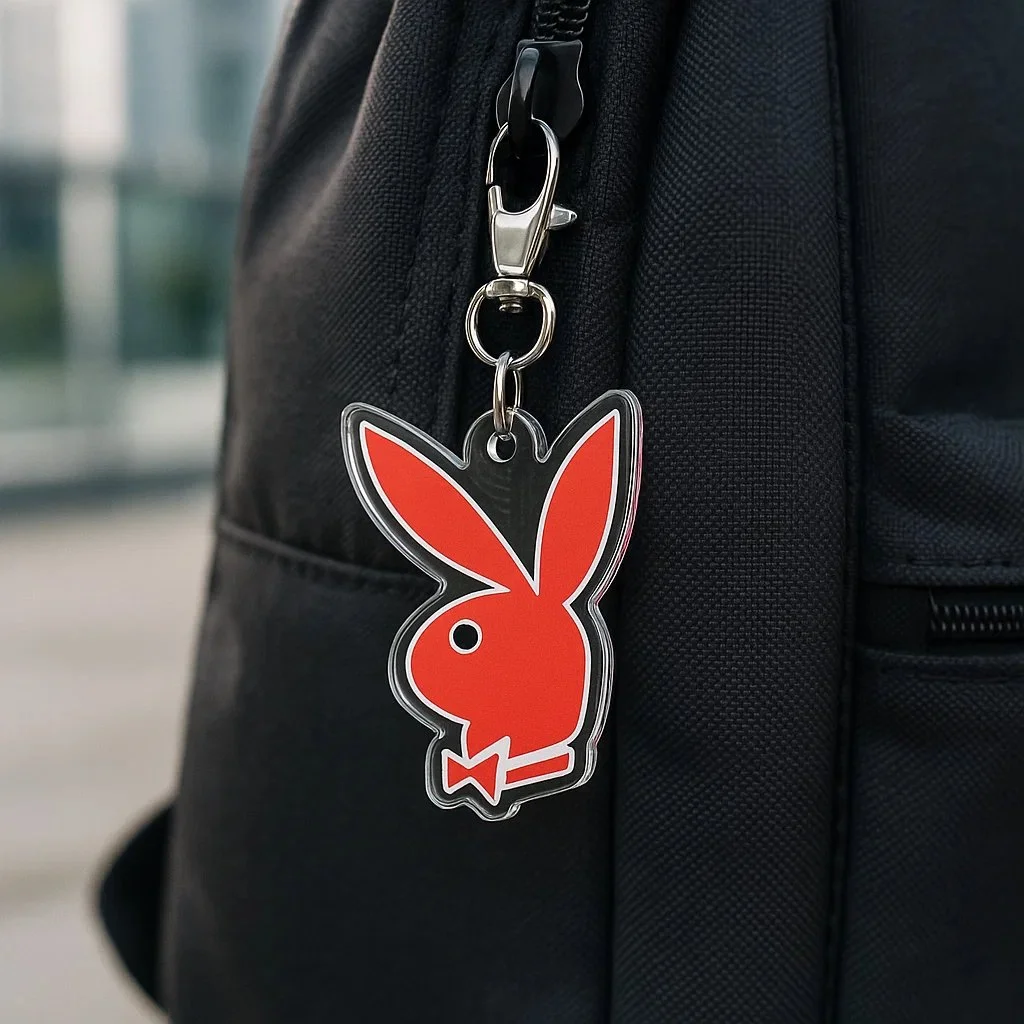
Create a photorealistic square image (1080x1080) showing a custom acrylic keychain version of the [LOGO] logo hanging from the zipper of a dark-colored backpack (e.g. black or grey). The logo must retain its original shape, color, and proportions without any alteration. The keychain should have a clear glossy acrylic layer, clipped with a silver metal ring and clasp. Use soft daylight or diffused lighting to avoid yellow tones. Set the background in a modern outdoor setting, but keep it blurred to maintain focus on the logo keychain.
Create a photorealistic square image (1080x1080) showing a custom acrylic keychain version of the [LOGO] logo hanging from the zipper of a dark-colored backpack (e.g. black or grey). The logo must retain its original shape, color, and proportions without any alteration. The keychain should have a clear glossy acrylic layer, clipped with a silver metal ring and clasp. Use soft daylight or diffused lighting to avoid yellow tones. Set the background in a modern outdoor setting, but keep it blurred to maintain focus on the logo keychain.
Prompt verificado
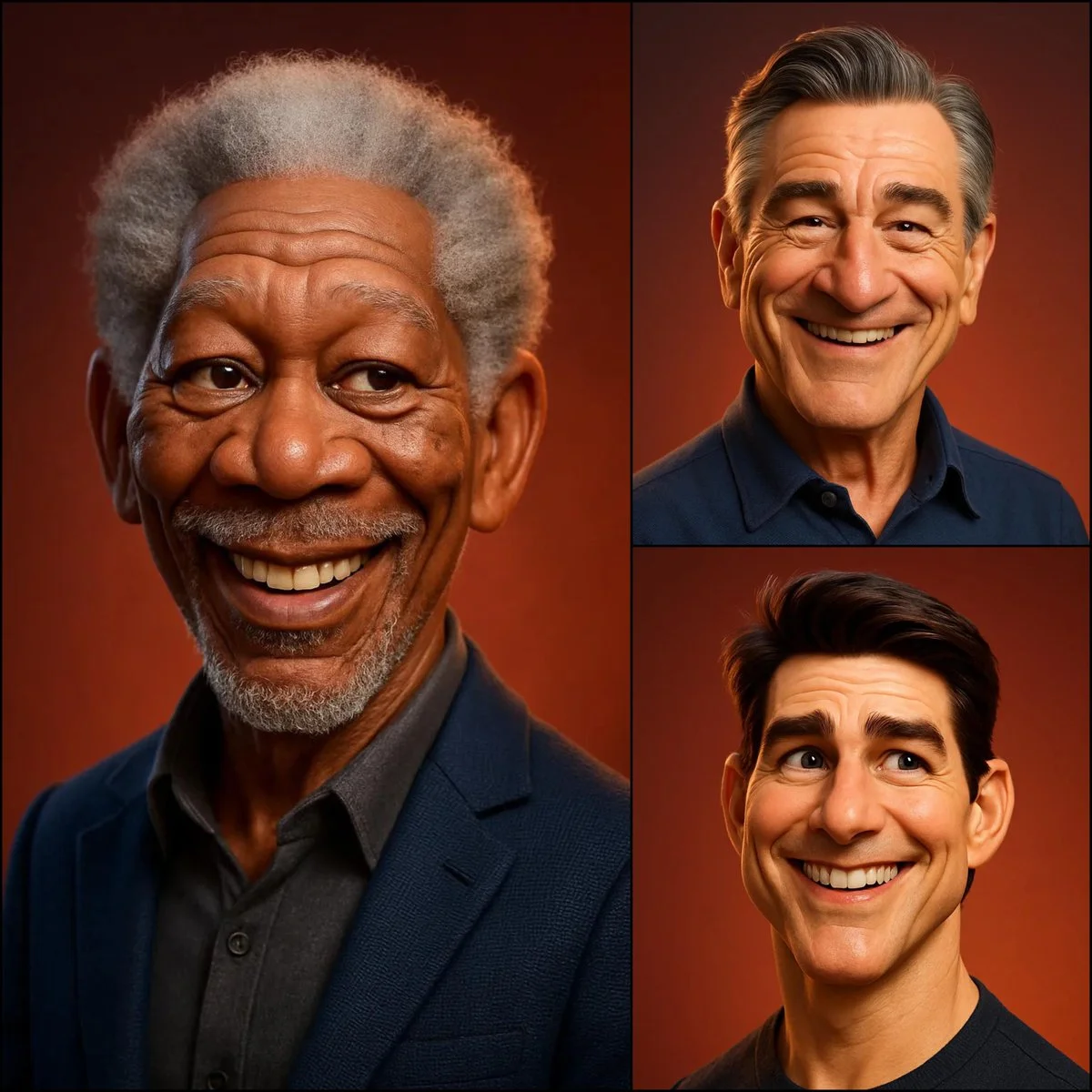
3D caricature portrait of [SUBJECT], Pixar/DreamWorks style — expressive eyes, slightly oversized head, exaggerated ears & nose, realistic skin shading with soft subsurface scattering, detailed hair, gentle warm smile, smooth polished materials, subtle fabric texture, soft ambient lighting, warm reddish-orange gradient background — balanced realism and stylized charm.
3D caricature portrait of [SUBJECT], Pixar/DreamWorks style — expressive eyes, slightly oversized head, exaggerated ears & nose, realistic skin shading with soft subsurface scattering, detailed hair, gentle warm smile, smooth polished materials, subtle fabric texture, soft ambient lighting, warm reddish-orange gradient background — balanced realism and stylized charm.
Prompt verificado
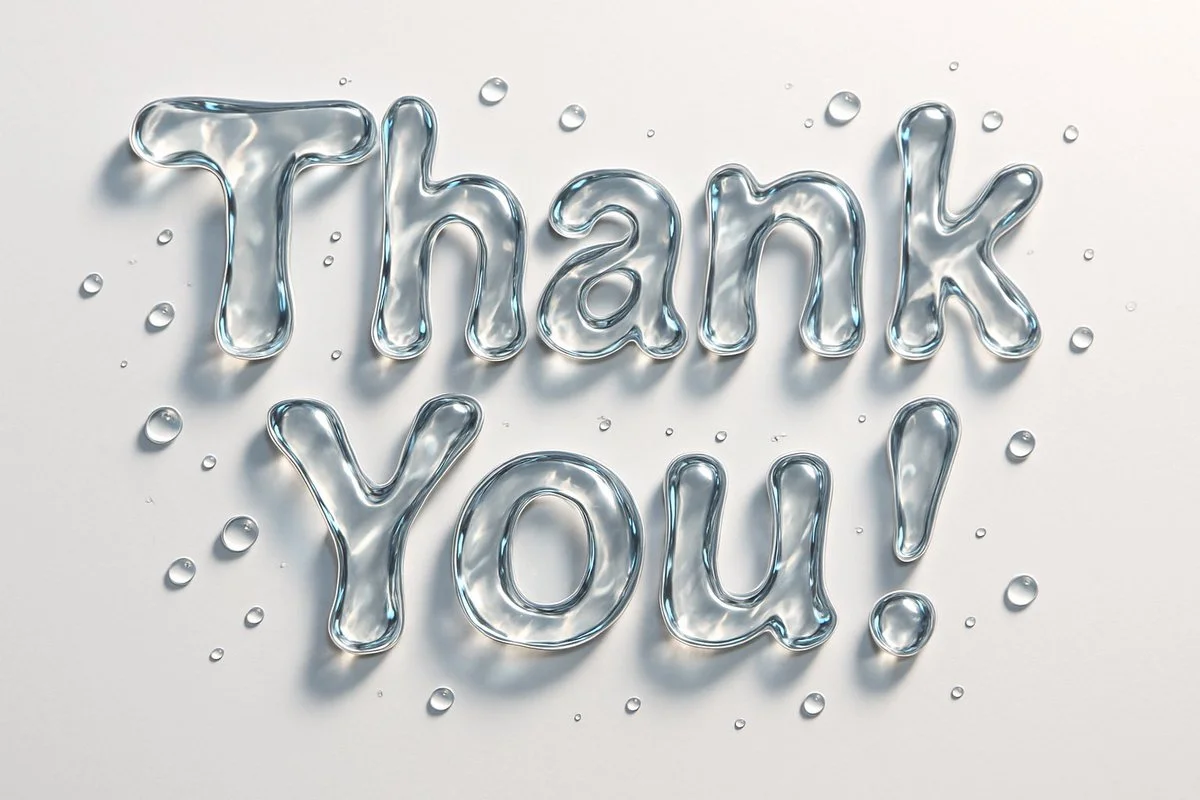
Abstract liquid typography spelling "text", made of thick, transparent water-gel with realistic refraction and soft shadows. Each letter appears sculpted from droplets with surface tension, smooth curves, and light reflections. Water droplets scattered on the surface, minimal background, hyper-realistic lighting, photorealistic render
Abstract liquid typography spelling "text", made of thick, transparent water-gel with realistic refraction and soft shadows. Each letter appears sculpted from droplets with surface tension, smooth curves, and light reflections. Water droplets scattered on the surface, minimal background, hyper-realistic lighting, photorealistic render
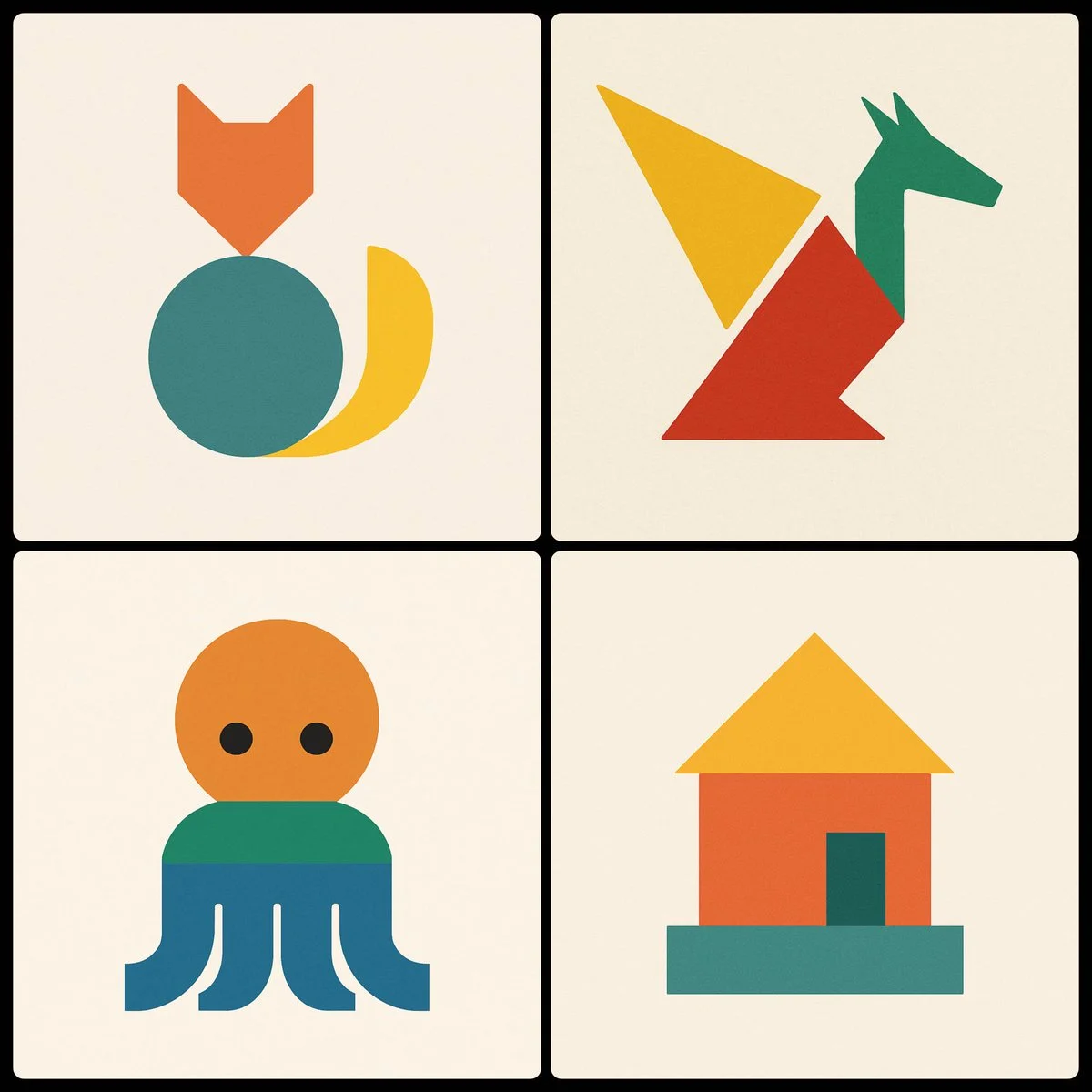
Prompt verificado
Create a minimalist image of a [SUBJECT] using three geometric shapes, using a different color in each shape
Create a minimalist image of a [SUBJECT] using three geometric shapes, using a different color in each shape
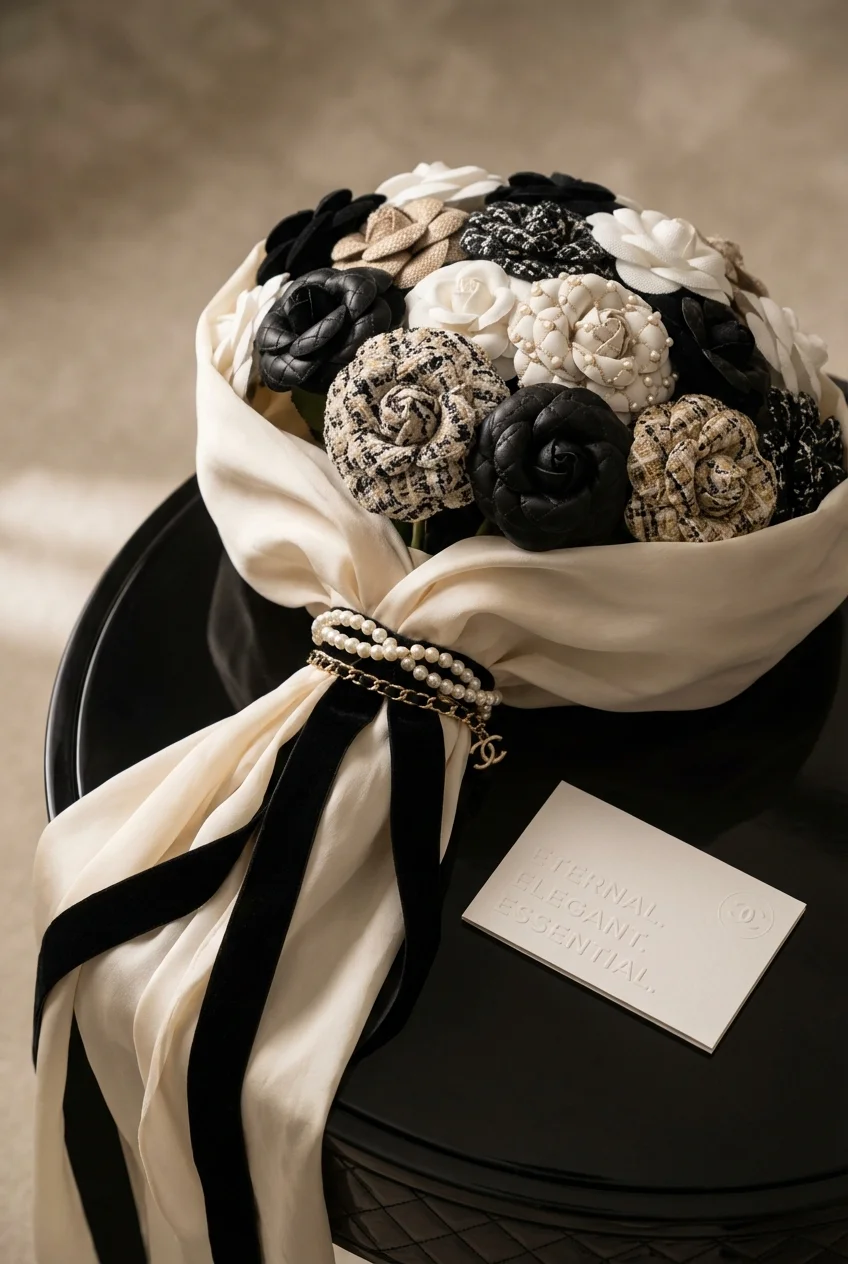
Prompt verificado
mantic square-format bouquet inspired by [Brand Name]. Roses are crafted from visual patterns or textures that reflect the brand’s identity. The bouquet is wrapped in luxurious material echoing the brand’s signature style (e.g. silk, velvet, leather), and elegantly tied with one of the brand’s iconic products, replacing a traditional ribbon. Place it on a surface that matches the brand’s aesthetic. Add a message card beside the bouquet with a short, emotional 3-word slogan representing the brand’s spirit. Include the [Brand Name] logo subtly in the scene. Cinematic lighting, ultra-detailed, elegant depth of field, premium editorial quality.
mantic square-format bouquet inspired by [Brand Name]. Roses are crafted from visual patterns or textures that reflect the brand’s identity. The bouquet is wrapped in luxurious material echoing the brand’s signature style (e.g. silk, velvet, leather), and elegantly tied with one of the brand’s iconic products, replacing a traditional ribbon. Place it on a surface that matches the brand’s aesthetic. Add a message card beside the bouquet with a short, emotional 3-word slogan representing the brand’s spirit. Include the [Brand Name] logo subtly in the scene. Cinematic lighting, ultra-detailed, elegant depth of field, premium editorial quality.
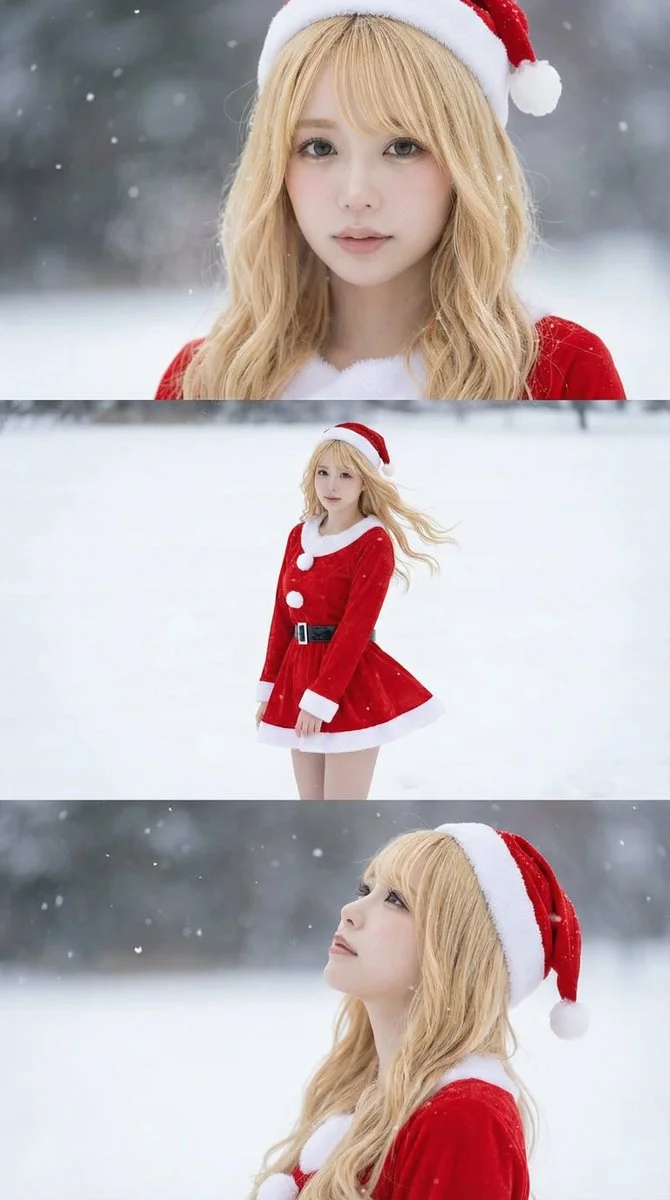
Prompt verificado
Borrowed from @iX00AI: Using the uploaded reference image, generate a horizontal three-panel composition with mini-skirt Santa cosplay in winter snow theme.
Borrowed from @iX00AI: Using the uploaded reference image, generate a horizontal three-panel composition with mini-skirt Santa cosplay in winter snow theme.
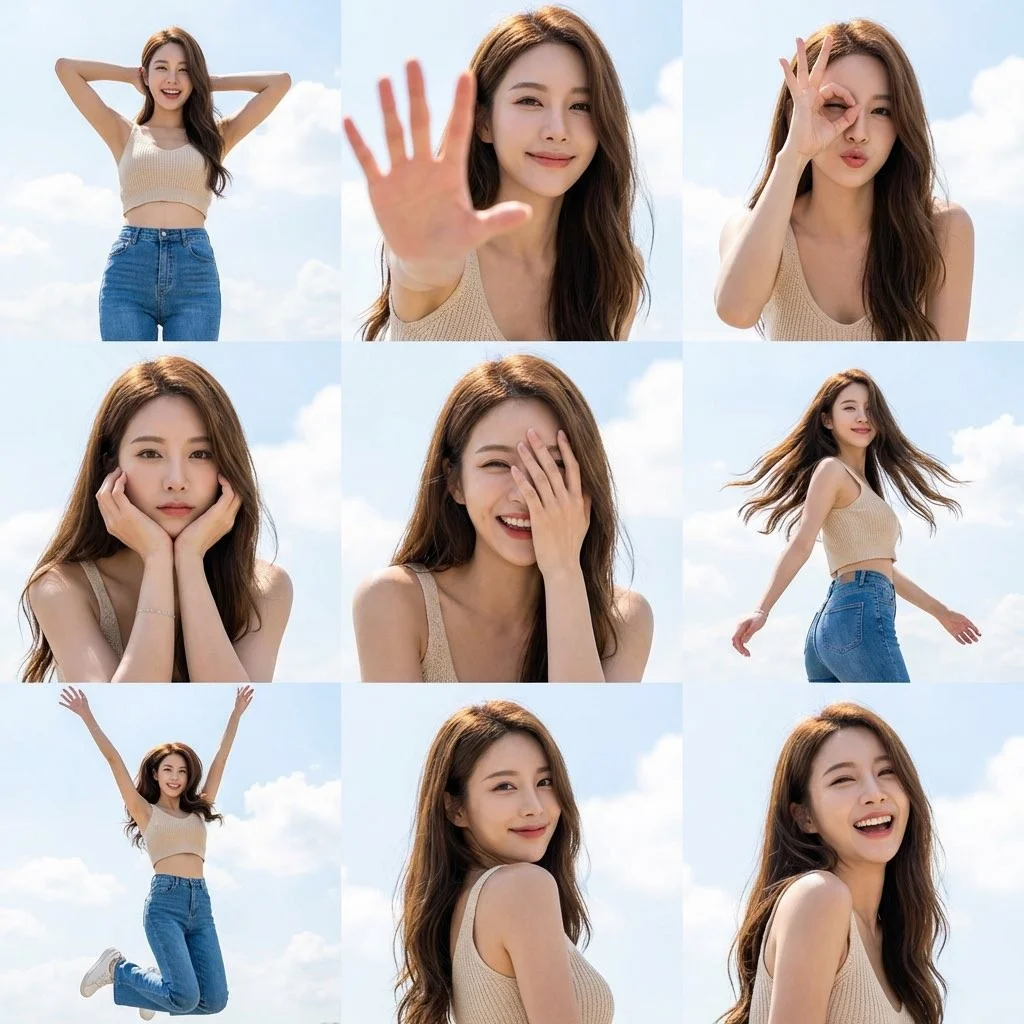
Prompt verificado
Create a 3x3 grid photo collage of nine dynamic poses of a female subject with sunny sky aesthetics. Strict face preservation mode. Use uploaded reference for exact facial features. Face identical across all nine frames. 3x3 grid layout. 35mm full-body to 85mm close-ups focal length mix. Pose variety: Wide stance hands behind head, Palm extended toward camera, OK gesture over eye playful, Chin resting in both hands, Half face covered by hand, Twirling with hair flowing, Jumping with arms up, Looking over shoulder, Candid laughing. Light beige knit crop top, high-waisted blue jeans, delicate gold necklace. Confident, radiant, approachable presence. Outdoor open sky setting. Vibrant azure sky with clouds background. Harsh high-key natural sunlight with crisp defined shadows. 8K hyper-realistic resolution. High-end lifestyle campaign aesthetic.
Create a 3x3 grid photo collage of nine dynamic poses of a female subject with sunny sky aesthetics. Strict face preservation mode. Use uploaded reference for exact facial features. Face identical across all nine frames. 3x3 grid layout. 35mm full-body to 85mm close-ups focal length mix. Pose variety: Wide stance hands behind head, Palm extended toward camera, OK gesture over eye playful, Chin resting in both hands, Half face covered by hand, Twirling with hair flowing, Jumping with arms up, Looking over shoulder, Candid laughing. Light beige knit crop top, high-waisted blue jeans, delicate gold necklace. Confident, radiant, approachable presence. Outdoor open sky setting. Vibrant azure sky with clouds background. Harsh high-key natural sunlight with crisp defined shadows. 8K hyper-realistic resolution. High-end lifestyle campaign aesthetic.
Prompt verificado
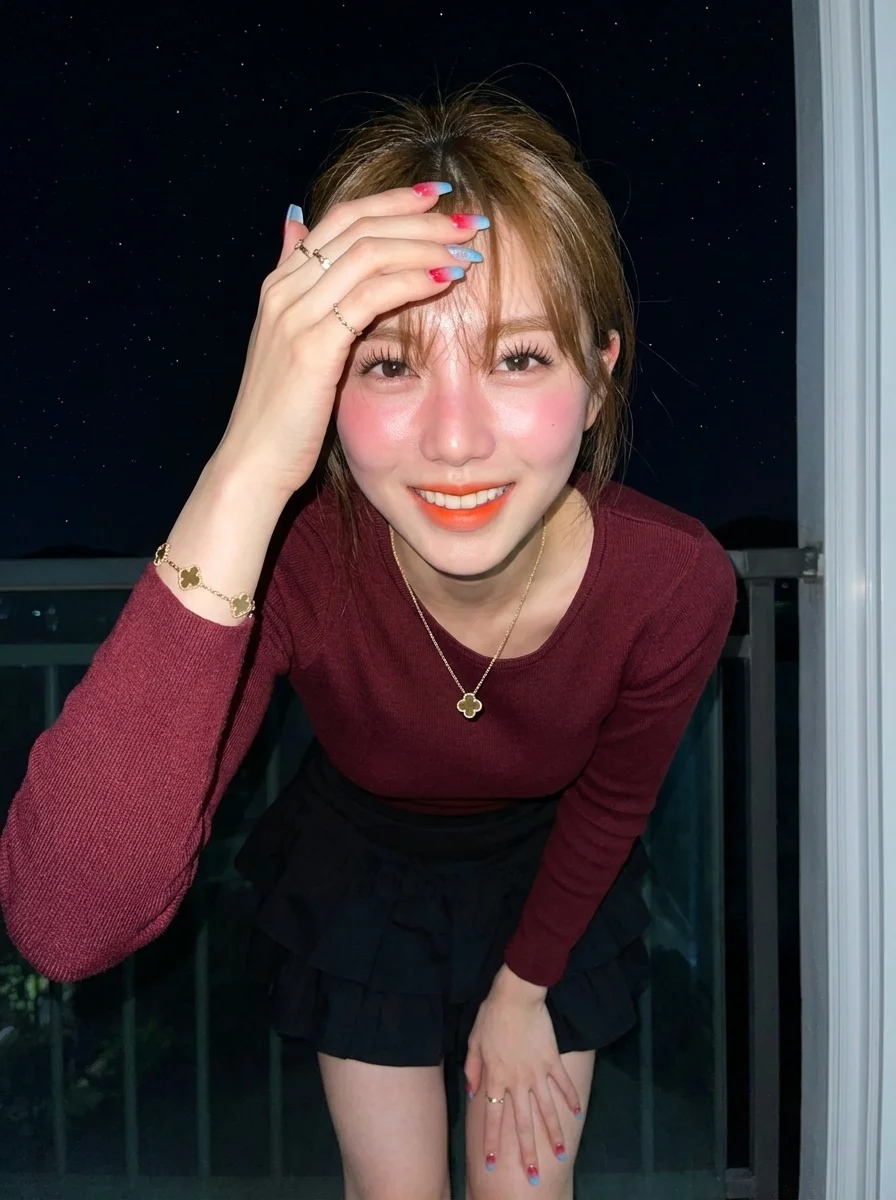
istic portrait of a sweet-faced woman in her mid-20s, with her face, eyes, ears, nose, and mouth completely unedited, preserving 100% facial accuracy. She is standing facing the camera, joyfully touching her slightly messy bangs with her fingers. Her hair is light brown, long, gently wavy with bangs, moving naturally according to her pose. She wears a gold clover pendant necklace, small gold rings on both hands, and a gold clover bracelet. Her nails are coffin-shaped with a red-to-sky blue gradient and glitter. Her skin is fair with a reddish tone, bright and radiant, and her body type is ideal. Makeup includes long thick eyelashes, pink blush on cheeks and nose for a goddess-like glow, neatly shaped light brown natural eyebrows, and ombre orange lipstick. She is dressed in a fitted maroon long-sleeve Sabrina knit top paired with a layered black mini ruffle skirt. She stands on her home balcony, raising her right hand to sweep her bangs with joy, with a neutral, simple, and energetic expression. The background shows a starry night sky as seen from the balcony. The scene is illuminated by a bright direct camera flash, creating high contrast, bright shadows, and a cool color temperature, giving a raw, sharp night-photography effect. The image is 8K resolution with extremely smooth skin texture, sharp focus, and a masterpiece quality, in portrait orientation.
istic portrait of a sweet-faced woman in her mid-20s, with her face, eyes, ears, nose, and mouth completely unedited, preserving 100% facial accuracy. She is standing facing the camera, joyfully touching her slightly messy bangs with her fingers. Her hair is light brown, long, gently wavy with bangs, moving naturally according to her pose. She wears a gold clover pendant necklace, small gold rings on both hands, and a gold clover bracelet. Her nails are coffin-shaped with a red-to-sky blue gradient and glitter. Her skin is fair with a reddish tone, bright and radiant, and her body type is ideal. Makeup includes long thick eyelashes, pink blush on cheeks and nose for a goddess-like glow, neatly shaped light brown natural eyebrows, and ombre orange lipstick. She is dressed in a fitted maroon long-sleeve Sabrina knit top paired with a layered black mini ruffle skirt. She stands on her home balcony, raising her right hand to sweep her bangs with joy, with a neutral, simple, and energetic expression. The background shows a starry night sky as seen from the balcony. The scene is illuminated by a bright direct camera flash, creating high contrast, bright shadows, and a cool color temperature, giving a raw, sharp night-photography effect. The image is 8K resolution with extremely smooth skin texture, sharp focus, and a masterpiece quality, in portrait orientation.
Explora flujos de trabajo de imágenes
Explora el flujo de trabajo de Nano Banana 2 y compáralo con las páginas de imágenes relacionadas. El generador es la fuente de verdad para el acceso y la configuración actuales del modelo. Usa la biblioteca de prompts para estudiar los resultados publicados y el modelo que los creó.


Nano Banana 2: Crea y edita con lenguaje natural
Desarrolla tu brief de imagen de Nano Banana 2 en torno al resultado que necesitas. Mantén la dirección principal específica, revisa la configuración compatible en el generador y examina el trabajo completado antes de usarlo en tu proyecto.
Elige solo la resolución y la relación de aspecto que se muestran para el modelo seleccionado. Revisa el encuadre, los detalles finos y cualquier texto en la imagen completada. Un tamaño de salida más grande no garantiza un resultado más preciso.
Explorar Nano Banana 2
De un brief a una imagen revisada: el flujo de trabajo de Nano Banana 2
Deja tiempo para inspeccionar cada resultado de imagen y refinar tu brief. El tiempo de procesamiento varía según el modelo, la solicitud y la carga del servicio. Cambia una dirección a la vez para poder juzgar qué edición mejora el resultado.

Ingrese el mensaje o cargue la imagen
Comienza tu brief de imagen de Nano Banana 2 con una imagen de origen que tengas permiso de usar. Nombra el área a cambiar y los colores, proporciones u objetos a preservar. La cantidad de referencias y la compatibilidad de edición dependen del modelo seleccionado.

Revisa disponibilidad, configuración y créditos
Deja tiempo para inspeccionar cada resultado de imagen y refinar tu brief. El tiempo de procesamiento varía según el modelo, la solicitud y la carga del servicio. Cambia una dirección a la vez para poder juzgar qué edición mejora el resultado.

Revisa y descarga los resultados completados
Cuando se complete una solicitud, inspecciona la imagen en Historial y descarga el resultado que quieras conservar. Revisa la composición y cualquier detalle no intencionado antes de compartirlo con tu equipo o publicarlo.
Crea tu brief de imagen de Nano Banana 2
Para un concepto de producto con Nano Banana 2, especifica la forma del producto, el material, el detalle clave y el entorno. Mantén los logotipos y las afirmaciones precisos, deja espacio para tu propia tipografía y revisa el resultado antes de usarlo en un anuncio.

Explica tu sujeto, cambios y referencias
Comienza tu brief de imagen de Nano Banana 2 con una imagen de origen que tengas permiso de usar. Nombra el área a cambiar y los colores, proporciones u objetos a preservar. La cantidad de referencias y la compatibilidad de edición dependen del modelo seleccionado.

Describe los cambios y los detalles que deben preservarse
Escribe tu brief de imagen de Nano Banana 2 en torno a un sujeto, composición, iluminación y estilo previsto. Agrega un material o textura cuando sea importante. Para ediciones, indica un cambio preciso y explica qué partes del origen deben permanecer intactas.

Verifica los detalles en cada resultado
Deja tiempo para inspeccionar cada resultado de imagen y refinar tu brief. El tiempo de procesamiento varía según el modelo, la solicitud y la carga del servicio. Cambia una dirección a la vez para poder juzgar qué edición mejora el resultado.

Explica tu sujeto, cambios y referencias
Enumera los detalles que importan en tu brief de imagen de Nano Banana 2: identidad, forma, colores, vestimenta y fondo. Usa referencias compatibles cuando corresponda y compara cada resultado; no se garantiza una consistencia exacta.
Un brief creativo más claro para Nano Banana 2
Deja tiempo para inspeccionar cada resultado de imagen y refinar tu brief. El tiempo de procesamiento varía según el modelo, la solicitud y la carga del servicio. Cambia una dirección a la vez para poder juzgar qué edición mejora el resultado.

Explica tu sujeto, cambios y referencias
Deja tiempo para inspeccionar cada resultado de imagen y refinar tu brief. El tiempo de procesamiento varía según el modelo, la solicitud y la carga del servicio. Cambia una dirección a la vez para poder juzgar qué edición mejora el resultado.

Redes sociales y publicidad
Para un concepto de producto con Nano Banana 2, especifica la forma del producto, el material, el detalle clave y el entorno. Mantén los logotipos y las afirmaciones precisos, deja espacio para tu propia tipografía y revisa el resultado antes de usarlo en un anuncio.

Verifica los detalles en cada resultado
Enumera los detalles que importan en tu brief de imagen de Nano Banana 2: identidad, forma, colores, vestimenta y fondo. Usa referencias compatibles cuando corresponda y compara cada resultado; no se garantiza una consistencia exacta.

Flujo de trabajo de producción eficiente
Para un concepto de producto con Nano Banana 2, especifica la forma del producto, el material, el detalle clave y el entorno. Mantén los logotipos y las afirmaciones precisos, deja espacio para tu propia tipografía y revisa el resultado antes de usarlo en un anuncio.
Notas creativas para tu brief de imagen de Nano Banana 2
Dale al sujeto principal una acción clara. Para un concepto de Nano Banana 2, un brief preciso es más fácil de evaluar que una lista de efectos en competencia.

Flujo de trabajo de imágenes de Nano Banana 2: preguntas y respuestas
Para un concepto de producto con Nano Banana 2, especifica la forma del producto, el material, el detalle clave y el entorno. Mantén los logotipos y las afirmaciones precisos, deja espacio para tu propia tipografía y revisa el resultado antes de usarlo en un anuncio.
Esta página de klingai.me explica el flujo de trabajo de imagen de Nano Banana 2. Te ayuda a escribir un brief enfocado y revisar las entradas disponibles. El acceso actual se muestra en el generador; que un nombre de modelo aparezca en una guía no significa que actualmente acepte solicitudes.
Esta página de klingai.me explica el flujo de trabajo de imagen de Nano Banana 2. Te ayuda a escribir un brief enfocado y revisar las entradas disponibles. El acceso actual se muestra en el generador; que un nombre de modelo aparezca en una guía no significa que actualmente acepte solicitudes.
Escribe tu brief de imagen de Nano Banana 2 en torno a un sujeto, composición, iluminación y estilo previsto. Agrega un material o textura cuando sea importante. Para ediciones, indica un cambio preciso y explica qué partes del origen deben permanecer intactas.
Comienza tu brief de imagen de Nano Banana 2 con una imagen de origen que tengas permiso de usar. Nombra el área a cambiar y los colores, proporciones u objetos a preservar. La cantidad de referencias y la compatibilidad de edición dependen del modelo seleccionado.
Desarrolla tu brief de imagen de Nano Banana 2 en torno al resultado que necesitas. Mantén la dirección principal específica, revisa la configuración compatible en el generador y examina el trabajo completado antes de usarlo en tu proyecto.
Esta página de klingai.me explica el flujo de trabajo de imagen de Nano Banana 2. Te ayuda a escribir un brief enfocado y revisar las entradas disponibles. El acceso actual se muestra en el generador; que un nombre de modelo aparezca en una guía no significa que actualmente acepte solicitudes.
Usa solo los modos de entrada y controles que ofrece el modelo seleccionado. Describe la imagen deseada con claridad y añade referencias compatibles cuando sea útil. Esta página no promete herramientas separadas de pincel de movimiento, carga de audio, restauración o edición.
Enumera los detalles que importan en tu brief de imagen de Nano Banana 2: identidad, forma, colores, vestimenta y fondo. Usa referencias compatibles cuando corresponda y compara cada resultado; no se garantiza una consistencia exacta.
Escribe tu brief de imagen de Nano Banana 2 en torno a un sujeto, composición, iluminación y estilo previsto. Agrega un material o textura cuando sea importante. Para ediciones, indica un cambio preciso y explica qué partes del origen deben permanecer intactas.
Para un concepto de producto con Nano Banana 2, especifica la forma del producto, el material, el detalle clave y el entorno. Mantén los logotipos y las afirmaciones precisos, deja espacio para tu propia tipografía y revisa el resultado antes de usarlo en un anuncio.
Elige solo la resolución y la relación de aspecto que se muestran para el modelo seleccionado. Revisa el encuadre, los detalles finos y cualquier texto en la imagen completada. Un tamaño de salida más grande no garantiza un resultado más preciso.
Explora tu próxima idea de imagen con Nano Banana 2
Elige solo la resolución y la relación de aspecto que se muestran para el modelo seleccionado. Revisa el encuadre, los detalles finos y cualquier texto en la imagen completada. Un tamaño de salida más grande no garantiza un resultado más preciso.