Verifizierter Prompt
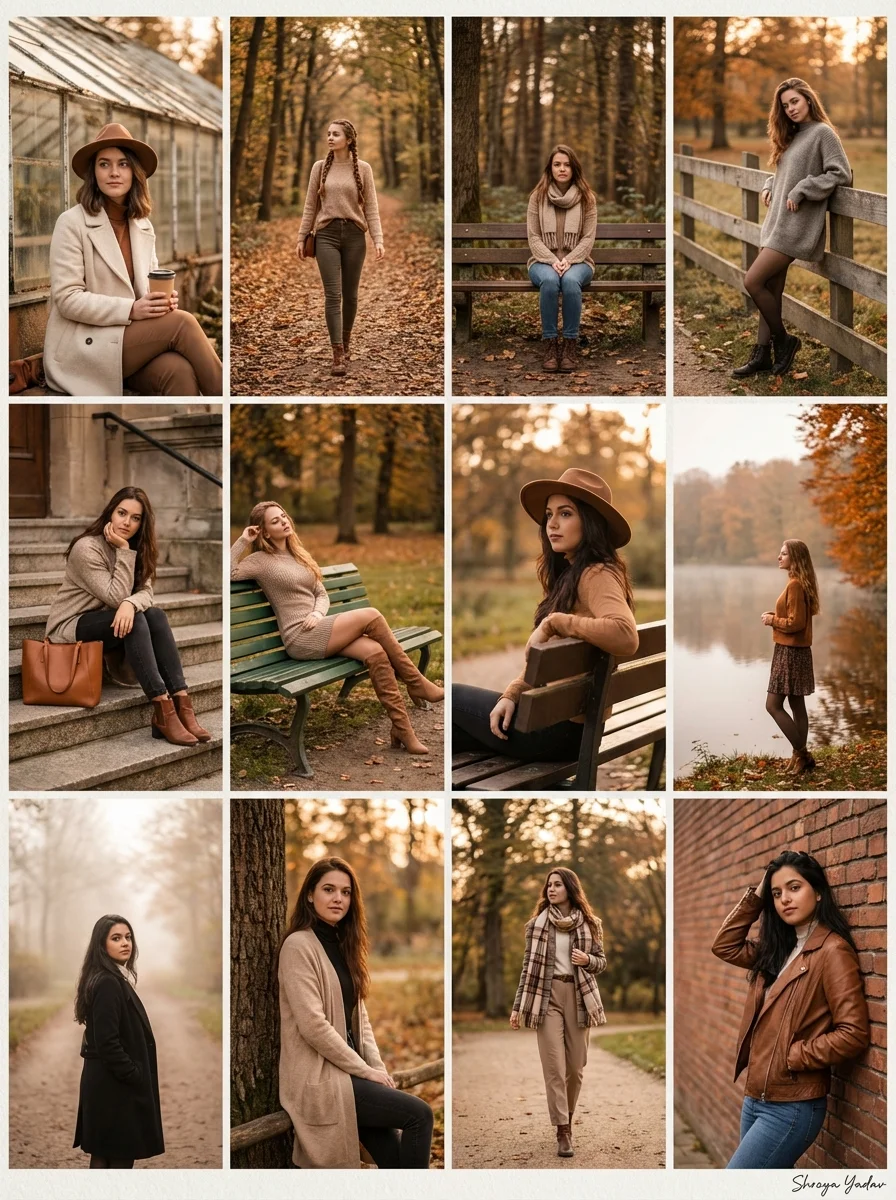
te a high‑resolution autumn fashion collage composed of 12 separate photos arranged in a neat grid, each featuring a stylish young woman with different random faces and hairstyles, not resembling any real or famous person. Show her in a variety of cozy outdoor poses: sitting by an old glass greenhouse with a takeaway coffee cup, walking along a tree‑lined path covered in orange leaves,sitting alone on a wooden bench deep in the forest, leaning against a park fence, resting on stone steps with a leather tote bag, lounging on a green park bench in a short dress and knee‑high boots, sitting sideways on a bench, standing near a calm lake lined with orange trees, and standing on a foggy path framed by tall trees. Outfits should mix long wool coats, oversized sweaters, scarves, wide‑brim hat, neutral trousers, knit dresses, and boots in earthy toneslike beige, brown, cream, gray, and black; lighting is warm golden hour with soft, cinematic color grading, shallow depth of field and creamy bokeh, giving the entire collage a cohesive, high‑end editorial influencer aesthetic Signature: Shreya Yadav
te a high‑resolution autumn fashion collage composed of 12 separate photos arranged in a neat grid, each featuring a stylish young woman with different random faces and hairstyles, not resembling any real or famous person. Show her in a variety of cozy outdoor poses: sitting by an old glass greenhouse with a takeaway coffee cup, walking along a tree‑lined path covered in orange leaves,sitting alone on a wooden bench deep in the forest, leaning against a park fence, resting on stone steps with a leather tote bag, lounging on a green park bench in a short dress and knee‑high boots, sitting sideways on a bench, standing near a calm lake lined with orange trees, and standing on a foggy path framed by tall trees. Outfits should mix long wool coats, oversized sweaters, scarves, wide‑brim hat, neutral trousers, knit dresses, and boots in earthy toneslike beige, brown, cream, gray, and black; lighting is warm golden hour with soft, cinematic color grading, shallow depth of field and creamy bokeh, giving the entire collage a cohesive, high‑end editorial influencer aesthetic Signature: Shreya Yadav
Verifizierter Prompt
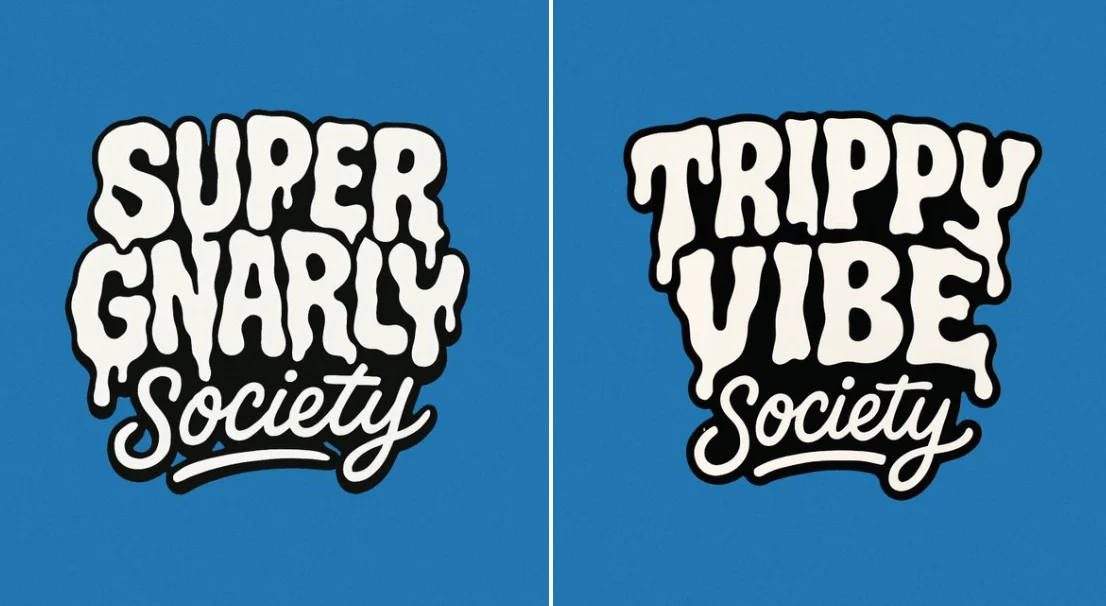
Create a bold, warped cartoon-style text design with two distinct layers. The top layer should say “SUPER GNARLY” in warped bubble letters with a melty, drippy texture, like ghost slime or goo. The letters should feel heavy and organic, with a slightly psychedelic or paranormal vibe. The bottom layer should say “SOCIETY” in much smaller, script-like or handwritten-style letters that tuck underneath or nestle between the larger title letters. Both layers should be solid white with thick black outlines. No gradients, shading, or texture. Layout should be playful and a little chaotic, but still readable. Vector friendly. Blue background. Square aspect ratio.
Create a bold, warped cartoon-style text design with two distinct layers. The top layer should say “SUPER GNARLY” in warped bubble letters with a melty, drippy texture, like ghost slime or goo. The letters should feel heavy and organic, with a slightly psychedelic or paranormal vibe. The bottom layer should say “SOCIETY” in much smaller, script-like or handwritten-style letters that tuck underneath or nestle between the larger title letters. Both layers should be solid white with thick black outlines. No gradients, shading, or texture. Layout should be playful and a little chaotic, but still readable. Vector friendly. Blue background. Square aspect ratio.
Verifizierter Prompt
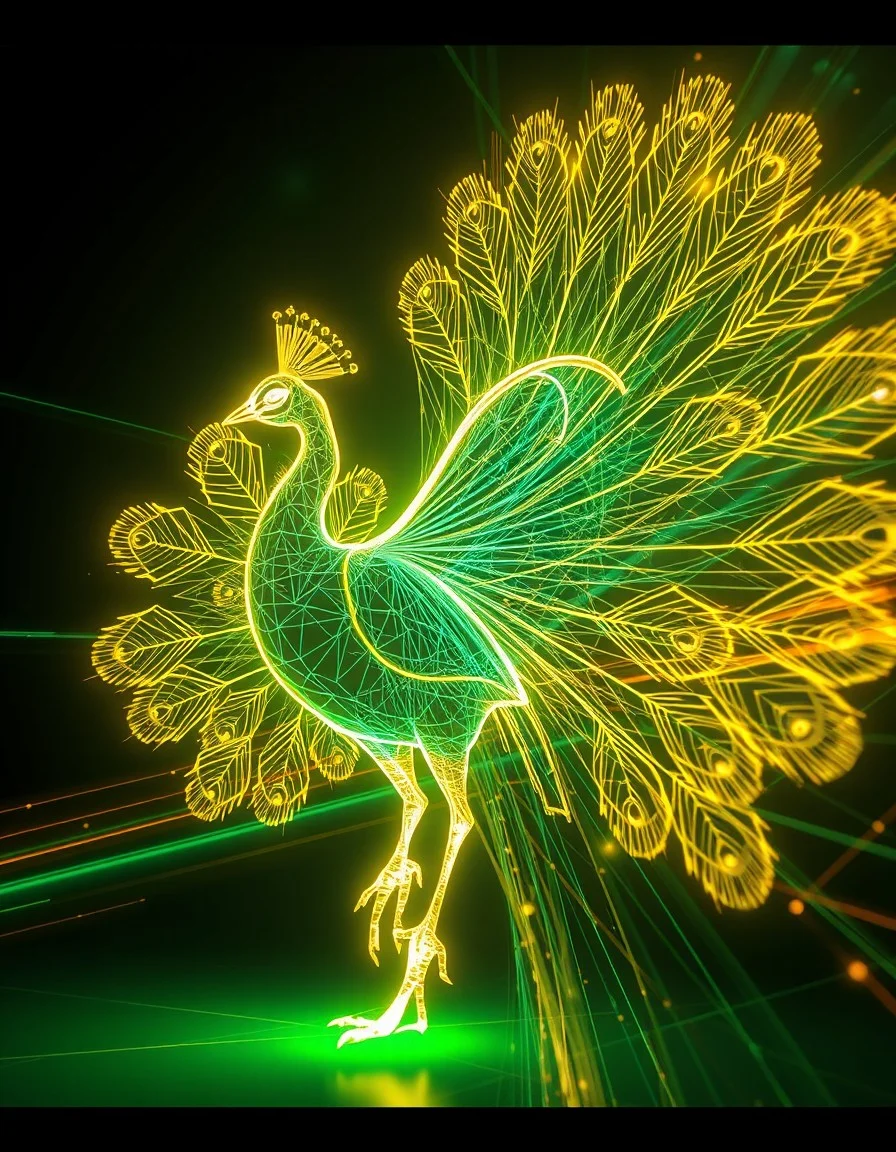
A neon wireframe visualization of a [subject], traced in glowing [color1] and [color2] vector lines. Suspended in a digital void, the figure is surrounded by speed trails, motion blur, and shifting geometric shadows, evoking a sense of kinetic energy and futuristic momentum.
A neon wireframe visualization of a [subject], traced in glowing [color1] and [color2] vector lines. Suspended in a digital void, the figure is surrounded by speed trails, motion blur, and shifting geometric shadows, evoking a sense of kinetic energy and futuristic momentum.
Verifizierter Prompt
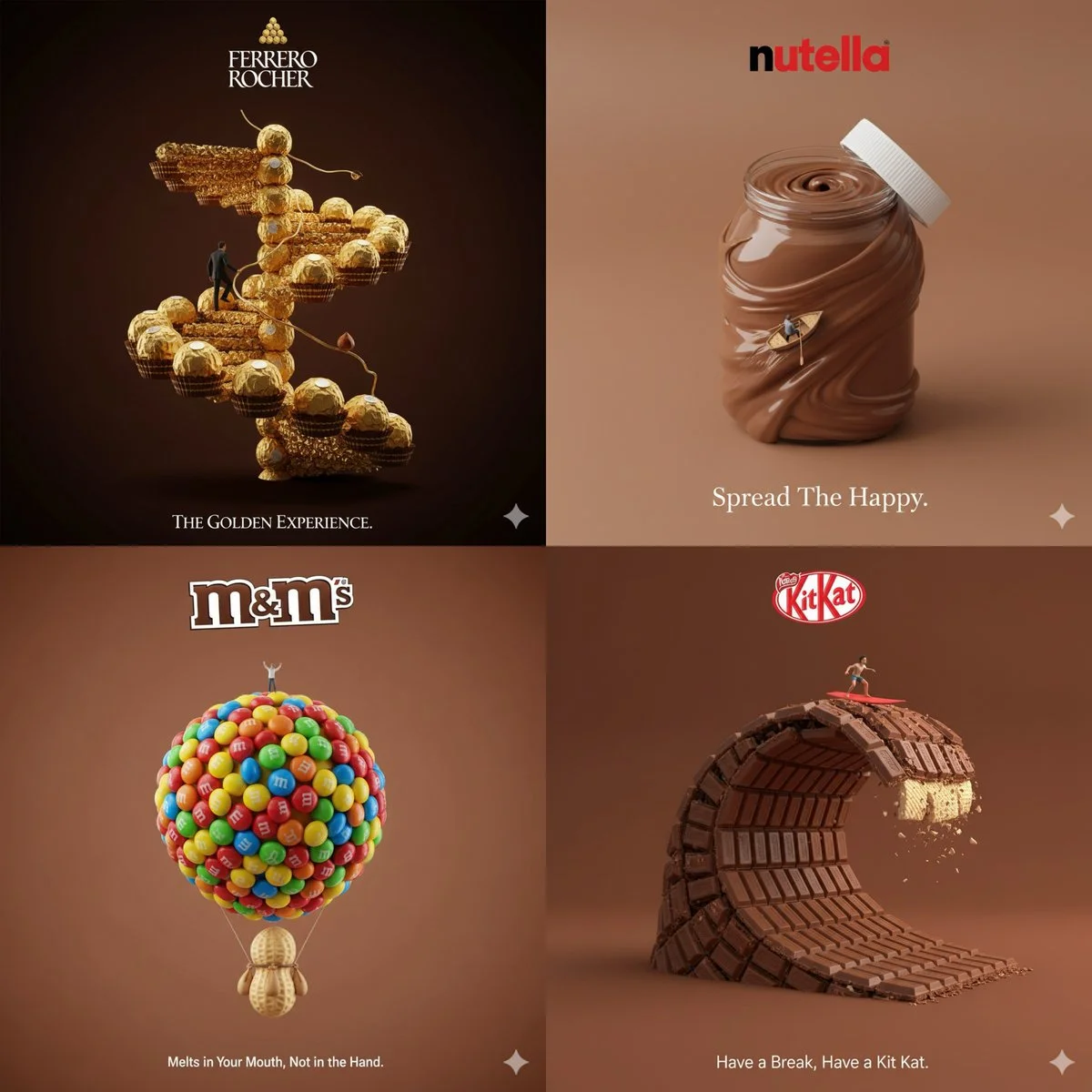
Creative 3D ad for [Brand Name], with surreal object made from it, matching background color, real slogan below, logo on top, miniature person interacting, minimal and clever concept
Creative 3D ad for [Brand Name], with surreal object made from it, matching background color, real slogan below, logo on top, miniature person interacting, minimal and clever concept
Verifizierter Prompt
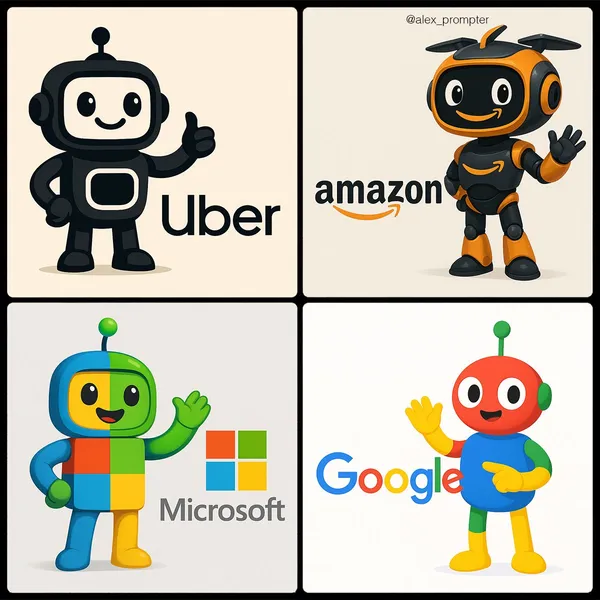
te a mascot for [BRAND NAME] logo following the JSON aesthetic below: { "style": "brand-inspired creative mascot generation", "subject_handling": { "adapt_to_uploaded_image": true, "preserve_uploaded_logo_shape_and_text": true, "extract_dominant_brand_colors": true, "analyze_logo_style_for_mood": true, "use_uploaded_image_as_primary_reference": true }, "mascot_generation": { "character_type": "open — could be an animal, humanoid, object, robot, fantasy creature, or abstract form", "design_strategy": "generate a mascot concept that visually complements the uploaded brand based on extracted brand colors, mood, and style", "style_alignment": "mascot should feel like part of the brand family — matching tone (playful, elegant, techy, minimal, etc.)", "color_usage": "use brand colors as dominant tones in mascot’s body, clothing, skin, or materials", "personality_embedding": "include expressive traits aligned with brand tone (e.g. curious, bold, serene, confident)" }, "composition": { "include_uploaded_logo_in_final_image": true, "arrangement": "mascot and logo presented together in a clear and balanced composition", "environment": "minimal scene or brand-aligned abstract background — not too busy", "interaction": "mascot may pose near, hold, or gesture to logo — but must not obscure or alter it" }, "lighting": { "type": "neutral or soft directional lighting depending on brand tone", "shadow_behavior": "soft contact shadows to ground elements" }, "camera": { "view_angle": "centered frontal or three-quarter depending on layout", "focus": "both mascot and logo in clear focus" }, "post_processing": { "enhance_color harmony between mascot and logo": true, "disable_style_overrides or artistic distortion": true }, "image_constraints": { "transparent_background": false, "aspect_ratio": [INSERT ASPECT RATIO], "include_text_if_present_in_logo": true, "preserve_uploaded_logo_geometry": true, "prevent_logo_modification": true }, "notes": "Use the uploaded logo or product image as the central brand reference. Automatically generate a unique mascot that feels like an original creation belonging to the brand — inspired by extracted colors, shapes, and mood. The mascot must not copy other mascots or use predefined templates. The final image should creatively showcase both the logo and its new mascot side-by-side, visually unified but distinct." }
te a mascot for [BRAND NAME] logo following the JSON aesthetic below: { "style": "brand-inspired creative mascot generation", "subject_handling": { "adapt_to_uploaded_image": true, "preserve_uploaded_logo_shape_and_text": true, "extract_dominant_brand_colors": true, "analyze_logo_style_for_mood": true, "use_uploaded_image_as_primary_reference": true }, "mascot_generation": { "character_type": "open — could be an animal, humanoid, object, robot, fantasy creature, or abstract form", "design_strategy": "generate a mascot concept that visually complements the uploaded brand based on extracted brand colors, mood, and style", "style_alignment": "mascot should feel like part of the brand family — matching tone (playful, elegant, techy, minimal, etc.)", "color_usage": "use brand colors as dominant tones in mascot’s body, clothing, skin, or materials", "personality_embedding": "include expressive traits aligned with brand tone (e.g. curious, bold, serene, confident)" }, "composition": { "include_uploaded_logo_in_final_image": true, "arrangement": "mascot and logo presented together in a clear and balanced composition", "environment": "minimal scene or brand-aligned abstract background — not too busy", "interaction": "mascot may pose near, hold, or gesture to logo — but must not obscure or alter it" }, "lighting": { "type": "neutral or soft directional lighting depending on brand tone", "shadow_behavior": "soft contact shadows to ground elements" }, "camera": { "view_angle": "centered frontal or three-quarter depending on layout", "focus": "both mascot and logo in clear focus" }, "post_processing": { "enhance_color harmony between mascot and logo": true, "disable_style_overrides or artistic distortion": true }, "image_constraints": { "transparent_background": false, "aspect_ratio": [INSERT ASPECT RATIO], "include_text_if_present_in_logo": true, "preserve_uploaded_logo_geometry": true, "prevent_logo_modification": true }, "notes": "Use the uploaded logo or product image as the central brand reference. Automatically generate a unique mascot that feels like an original creation belonging to the brand — inspired by extracted colors, shapes, and mood. The mascot must not copy other mascots or use predefined templates. The final image should creatively showcase both the logo and its new mascot side-by-side, visually unified but distinct." }
Verifizierter Prompt
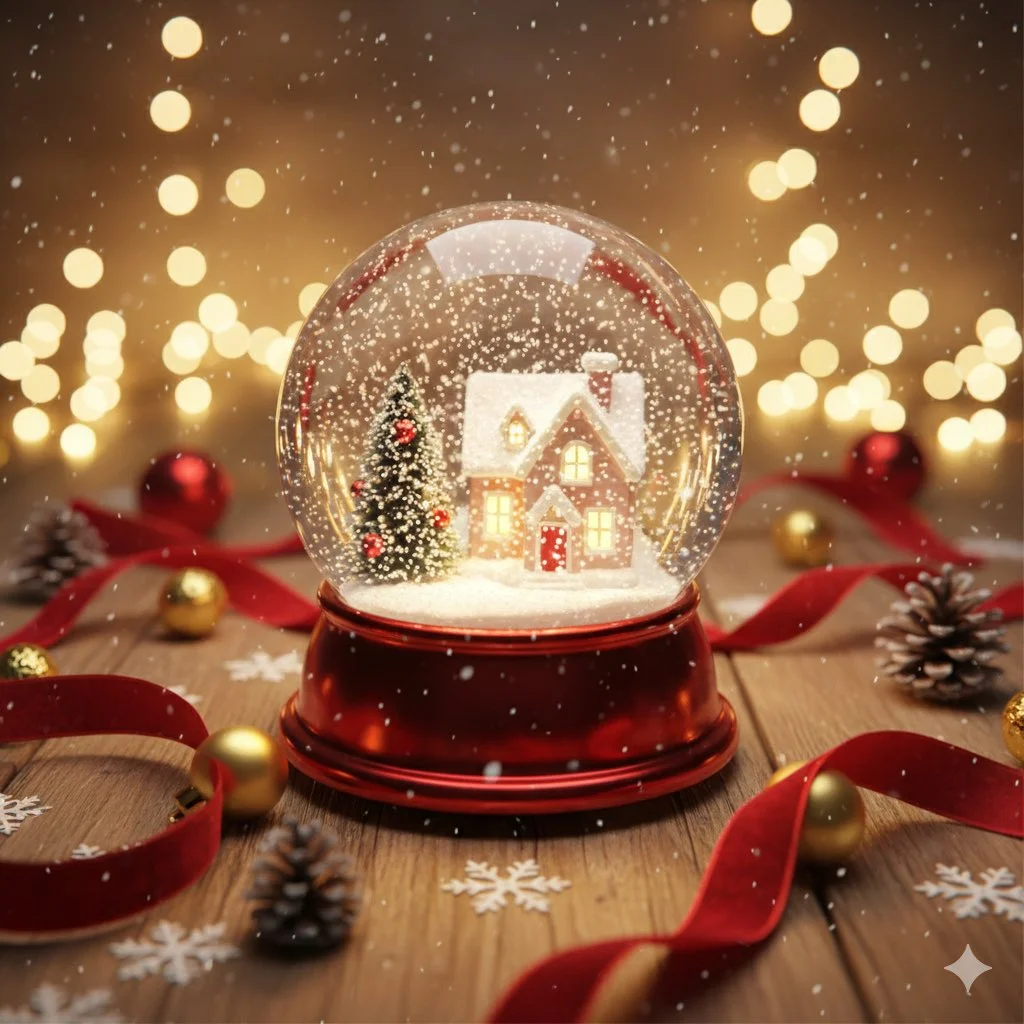
Create a hyper-realistic, cinematic Christmas gift card scene. Main object: sparkling snow globe with tiny cozy house inside, glittering snow, warm glowing lights, miniature Christmas tree. Environment: wooden table with scattered ornaments and ribbons, soft bokeh fairy lights background, gentle snowfall effect. Warm cinematic glow lighting, reds, golds, soft whites color palette. Slightly top-down angle focused on snow globe, shallow depth of field with dreamy background.
Create a hyper-realistic, cinematic Christmas gift card scene. Main object: sparkling snow globe with tiny cozy house inside, glittering snow, warm glowing lights, miniature Christmas tree. Environment: wooden table with scattered ornaments and ribbons, soft bokeh fairy lights background, gentle snowfall effect. Warm cinematic glow lighting, reds, golds, soft whites color palette. Slightly top-down angle focused on snow globe, shallow depth of field with dreamy background.
Verifizierter Prompt
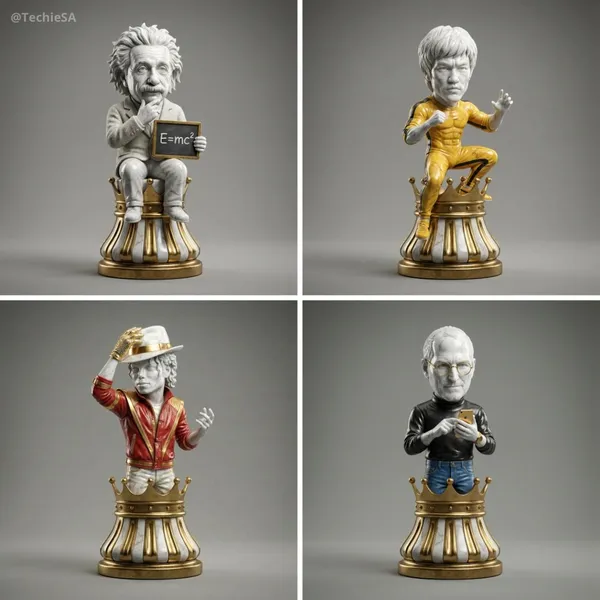
per-detailed 3D render of a collectible chess piece designed as [ICON]. The figure is sculpted in polished marble and gold accents, with a stylized base resembling a classic chess piece. The character’s iconic features, clothing, or accessories are faithfully captured in a simplified but instantly recognizable form. Studio lighting with soft reflections, dramatic shadows, photorealistic textures, cinematic presentation. Centered on a clean neutral background, 1080x1080 square format.
per-detailed 3D render of a collectible chess piece designed as [ICON]. The figure is sculpted in polished marble and gold accents, with a stylized base resembling a classic chess piece. The character’s iconic features, clothing, or accessories are faithfully captured in a simplified but instantly recognizable form. Studio lighting with soft reflections, dramatic shadows, photorealistic textures, cinematic presentation. Centered on a clean neutral background, 1080x1080 square format.
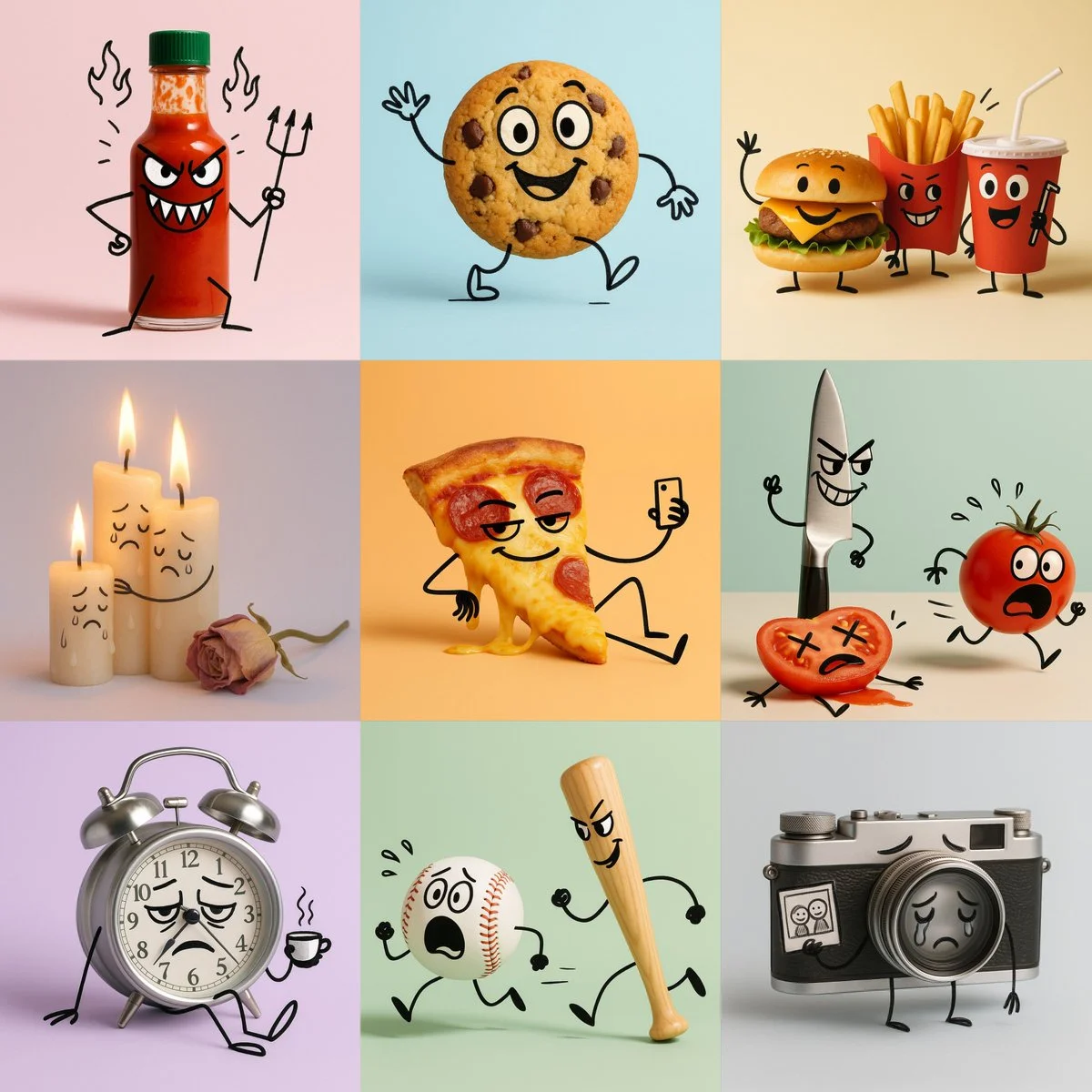
Verifizierter Prompt
A cartoon illustration of [OBJECT], photographed in a clean minimal studio setup. All objects remain realistic and three-dimensional, but have been transformed into expressive cartoon characters: • [DESCRIPTION & EMOTION] (describe facial features, expressions, and emotional tone for each object) • [ACTION] • doodle lines are black, slightly uneven, and hand-drawn — like quick expressive sketchbook strokes drawn directly on the objects. Style: hybrid mix of real product photography and cartoon doodle overlay. Background: solid pastel [COLOR], clean and minimal. Lighting: soft, even, studio-style — subtle highlights and gentle shadows; no harsh light. Mood: [MOOD / THEME — e.g. playful, melancholic, poetic, humorous]. Keywords: hybrid photo-doodle, product cartoon, expressive characters, minimal pastel background. Aspect ratio: 1:1
A cartoon illustration of [OBJECT], photographed in a clean minimal studio setup. All objects remain realistic and three-dimensional, but have been transformed into expressive cartoon characters: • [DESCRIPTION & EMOTION] (describe facial features, expressions, and emotional tone for each object) • [ACTION] • doodle lines are black, slightly uneven, and hand-drawn — like quick expressive sketchbook strokes drawn directly on the objects. Style: hybrid mix of real product photography and cartoon doodle overlay. Background: solid pastel [COLOR], clean and minimal. Lighting: soft, even, studio-style — subtle highlights and gentle shadows; no harsh light. Mood: [MOOD / THEME — e.g. playful, melancholic, poetic, humorous]. Keywords: hybrid photo-doodle, product cartoon, expressive characters, minimal pastel background. Aspect ratio: 1:1
Verifizierter Prompt
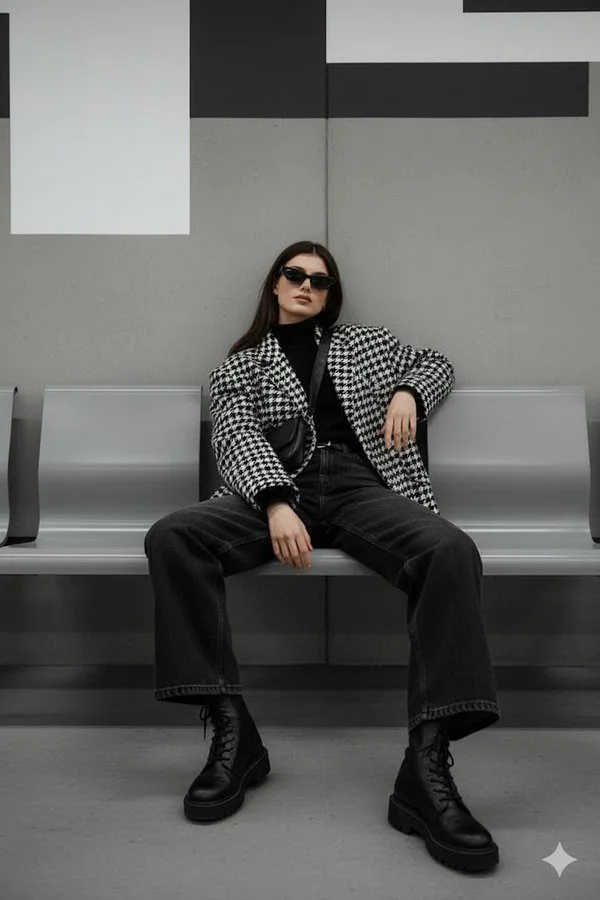
Verifizierter Prompt
Reference image: uploaded photo Face: keep the same face from the reference photo, calm and composed expression, eyes slightly hidden behind dark sunglasses. Preserve realistic proportions and lighting. Pose: seated pose on a modern subway bench, one arm resting on the leg, the other hanging down loosely. The body leans slightly forward with casual confidence, one shoulder lowered. Clothes: oversized houndstooth-patterned jacket over black turtleneck, wide dark jeans, chunky lace-up boots. Accessories: narrow black sunglasses, subtle rings, crossbody strap barely visible. Background: minimalistic urban metro interior with grey concrete walls, metallic accents, and modern geometric design. Lighting: diffused artificial indoor light, soft shadows, neutral color balance emphasizing grayscale tones. Atmosphere: moody street editorial — quiet confidence, understated power, cinematic stillness. Format: 2:3 Do not replace face; keep the same person with realistic proportions and lighting accuracy.
Reference image: uploaded photo Face: keep the same face from the reference photo, calm and composed expression, eyes slightly hidden behind dark sunglasses. Preserve realistic proportions and lighting. Pose: seated pose on a modern subway bench, one arm resting on the leg, the other hanging down loosely. The body leans slightly forward with casual confidence, one shoulder lowered. Clothes: oversized houndstooth-patterned jacket over black turtleneck, wide dark jeans, chunky lace-up boots. Accessories: narrow black sunglasses, subtle rings, crossbody strap barely visible. Background: minimalistic urban metro interior with grey concrete walls, metallic accents, and modern geometric design. Lighting: diffused artificial indoor light, soft shadows, neutral color balance emphasizing grayscale tones. Atmosphere: moody street editorial — quiet confidence, understated power, cinematic stillness. Format: 2:3 Do not replace face; keep the same person with realistic proportions and lighting accuracy.
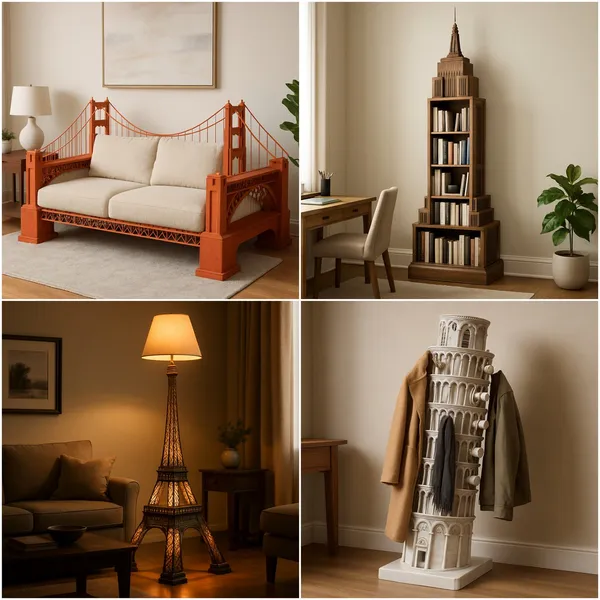
Verifizierter Prompt
[LANDMARK - Statue of Liberty/Eiffel Tower/Big Ben] perfectly carved and functional as a [FURNITURE_PIECE - lamp/bookshelf/coffee table], living room setting, normal scale furniture, photorealistic detail.
[LANDMARK - Statue of Liberty/Eiffel Tower/Big Ben] perfectly carved and functional as a [FURNITURE_PIECE - lamp/bookshelf/coffee table], living room setting, normal scale furniture, photorealistic detail.
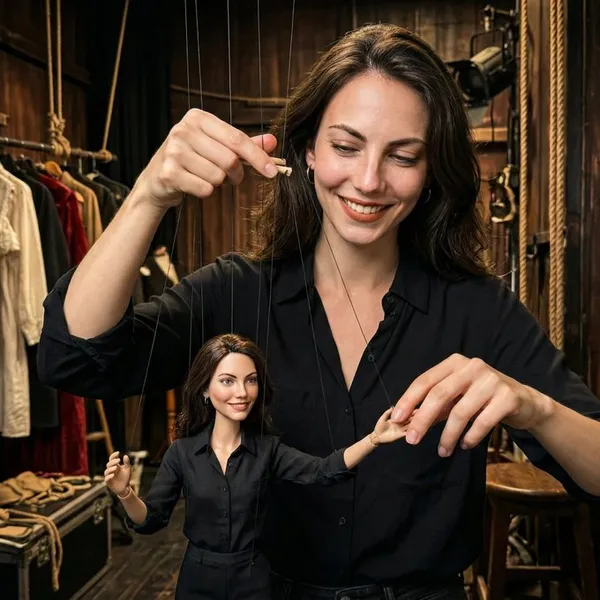
Verifizierter Prompt
ki kişi, bir tiyatro kulisinde kendisinin kopya kuklasını (marionette) parmaklarıyla hareket ettiriyor.
ki kişi, bir tiyatro kulisinde kendisinin kopya kuklasını (marionette) parmaklarıyla hareket ettiriyor.
Bild-Workflows erkunden
Erkunde den Nano Banana 2-Workflow und vergleiche ihn mit den verwandten Bildseiten. Der Generator ist die maßgebliche Quelle für aktuellen Modellzugriff und Einstellungen. Nutze die Prompt-Bibliothek, um veröffentlichte Ergebnisse und das Modell, das sie erstellt hat, zu studieren.


Nano Banana 2 KI-Bildgenerator
Schreibe dein Nano Banana 2-Bildbriefing rund um ein Motiv, eine Komposition, eine Beleuchtung und einen beabsichtigten Stil. Füge ein Material oder eine Textur hinzu, wenn es wichtig ist. Gib bei Bearbeitungen eine präzise Änderung an und erkläre, welche Teile der Quelle intakt bleiben sollen.
Schreibe dein Nano Banana 2-Bildbriefing rund um ein Motiv, eine Komposition, eine Beleuchtung und einen beabsichtigten Stil. Füge ein Material oder eine Textur hinzu, wenn es wichtig ist. Gib bei Bearbeitungen eine präzise Änderung an und erkläre, welche Teile der Quelle intakt bleiben sollen.
Erkunde Nano Banana 2Erstelle dein Nano Banana 2-Bildbriefing
Wähle nur die Auflösung und das Seitenverhältnis, die für das ausgewählte Modell angezeigt werden. Prüfe Bildausschnitt, feine Details und jeglichen Text im fertigen Bild. Eine größere Ausgabegröße garantiert kein genaueres Ergebnis.
Erweiterte KI-Bildgenerierung und -Anpassung
Wähle nur die Auflösung und das Seitenverhältnis, die für das ausgewählte Modell angezeigt werden. Prüfe Bildausschnitt, feine Details und jeglichen Text im fertigen Bild. Eine größere Ausgabegröße garantiert kein genaueres Ergebnis.
Formuliere präzise Bearbeitungs- und Stilvorgaben
Wähle nur die Auflösung und das Seitenverhältnis, die für das ausgewählte Modell angezeigt werden. Prüfe Bildausschnitt, feine Details und jeglichen Text im fertigen Bild. Eine größere Ausgabegröße garantiert kein genaueres Ergebnis.
Beschreibe die Änderungen und Details, die erhalten bleiben sollen
Erkunde den Nano Banana 2-Workflow und vergleiche ihn mit den verwandten Bildseiten. Der Generator ist die maßgebliche Quelle für aktuellen Modellzugriff und Einstellungen. Nutze die Prompt-Bibliothek, um veröffentlichte Ergebnisse und das Modell, das sie erstellt hat, zu studieren.
Beschreibe die Änderungen und Details, die erhalten bleiben sollen
Wähle nur die Auflösung und das Seitenverhältnis, die für das ausgewählte Modell angezeigt werden. Prüfe Bildausschnitt, feine Details und jeglichen Text im fertigen Bild. Eine größere Ausgabegröße garantiert kein genaueres Ergebnis.
Nutzungsbedingungen vor dem Teilen prüfen
Überprüfe die geltenden Modell- und Plattformbedingungen, bevor du ein Ergebnis kommerziell nutzt. Du bist verantwortlich für die Rechte an hochgeladenen Bildern, identifizierbaren Personen, Logos und jedem anderen Quellmaterial in deinem Nano Banana 2 Bild-Briefing.
Halte deinen Workflow einfach
Entwickle dein Nano Banana 2-Bildbriefing rund um das Ergebnis, das du brauchst. Halte die Hauptrichtung spezifisch, prüfe unterstützte Einstellungen im Generator und überprüfe die fertige Arbeit, bevor du sie in deinem Projekt verwendest.
Ein klareres kreatives Briefing für Nano Banana 2
Vielfältige Stile und Effekte für jede Vision
Entwickle dein Nano Banana 2-Bildbriefing rund um das Ergebnis, das du brauchst. Halte die Hauptrichtung spezifisch, prüfe unterstützte Einstellungen im Generator und überprüfe die fertige Arbeit, bevor du sie in deinem Projekt verwendest.
Schreibe dein Nano Banana 2-Bildbriefing rund um ein Motiv, eine Komposition, eine Beleuchtung und einen beabsichtigten Stil. Füge ein Material oder eine Textur hinzu, wenn es wichtig ist. Gib bei Bearbeitungen eine präzise Änderung an und erkläre, welche Teile der Quelle intakt bleiben sollen.
Vielseitiger Nano Banana 2 KI-Bildgenerator für die Vision jedes Creators
Beginne dein Nano Banana 2-Bildbriefing mit einem Quellbild, für das du die Berechtigung zur Nutzung hast. Benenne den Bereich, der geändert werden soll, und die Farben, Proportionen oder Objekte, die bewahrt werden sollen. Referenzanzahl und Bearbeitungsunterstützung hängen vom ausgewählten Modell ab.


Für Architekten und Designer
Schreibe dein Nano Banana 2-Bildbriefing rund um ein Motiv, eine Komposition, eine Beleuchtung und einen beabsichtigten Stil. Füge ein Material oder eine Textur hinzu, wenn es wichtig ist. Gib bei Bearbeitungen eine präzise Änderung an und erkläre, welche Teile der Quelle intakt bleiben sollen.

Für E-Commerce-Profis
Liste die Details auf, die in deinem Nano Banana 2-Bildbriefing wichtig sind: Identität, Form, Farben, Kleidung und Hintergrund. Verwende unterstützte Referenzen, wo angemessen, und vergleiche jedes Ergebnis; exakte Konsistenz ist nicht garantiert.

Für Content-Publisher
Wähle nur die Auflösung und das Seitenverhältnis, die für das ausgewählte Modell angezeigt werden. Prüfe Bildausschnitt, feine Details und jeglichen Text im fertigen Bild. Eine größere Ausgabegröße garantiert kein genaueres Ergebnis.

Für Veranstaltungsplaner
Schreibe dein Nano Banana 2-Bildbriefing rund um ein Motiv, eine Komposition, eine Beleuchtung und einen beabsichtigten Stil. Füge ein Material oder eine Textur hinzu, wenn es wichtig ist. Gib bei Bearbeitungen eine präzise Änderung an und erkläre, welche Teile der Quelle intakt bleiben sollen.
Von einem Briefing zu einem geprüften Bild: Der Nano Banana 2-Workflow
Fügen Sie Ihre Eingabe hinzu
Beginne dein Nano Banana 2-Bildbriefing mit einem Quellbild, für das du die Berechtigung zur Nutzung hast. Benenne den Bereich, der geändert werden soll, und die Farben, Proportionen oder Objekte, die bewahrt werden sollen. Referenzanzahl und Bearbeitungsunterstützung hängen vom ausgewählten Modell ab.
Passen Sie Ihre Optionen an
Der Generator zeigt die aktuelle Modellverfügbarkeit. Wenn ein Modell Anfragen annimmt, wähle seine unterstützten Einstellungen und prüfe die erforderlichen Credits, bevor du absendest. Prüfe deine Auswahl und dein Credit-Guthaben vor dem Generieren.
Generieren und verfeinern
Schreibe dein Nano Banana 2-Bildbriefing rund um ein Motiv, eine Komposition, eine Beleuchtung und einen beabsichtigten Stil. Füge ein Material oder eine Textur hinzu, wenn es wichtig ist. Gib bei Bearbeitungen eine präzise Änderung an und erkläre, welche Teile der Quelle intakt bleiben sollen.
Fertige Ergebnisse prüfen und herunterladen
Beginne dein Nano Banana 2-Bildbriefing mit einem Quellbild, für das du die Berechtigung zur Nutzung hast. Benenne den Bereich, der geändert werden soll, und die Farben, Proportionen oder Objekte, die bewahrt werden sollen. Referenzanzahl und Bearbeitungsunterstützung hängen vom ausgewählten Modell ab.
Nano Banana 2 Bild-Ideen für deine Projekte
Wähle nur die Auflösung und das Seitenverhältnis, die für das ausgewählte Modell angezeigt werden. Prüfe Bildausschnitt, feine Details und jeglichen Text im fertigen Bild. Eine größere Ausgabegröße garantiert kein genaueres Ergebnis.
Digitale Kunst und Illustration
Wähle nur die Auflösung und das Seitenverhältnis, die für das ausgewählte Modell angezeigt werden. Prüfe Bildausschnitt, feine Details und jeglichen Text im fertigen Bild. Eine größere Ausgabegröße garantiert kein genaueres Ergebnis.
Visuals für Marketing und E-Commerce
Gib für ein Nano Banana 2-Produktkonzept die Produktform, das Material, ein wichtiges Detail und die Umgebung an. Halte Logos und Aussagen korrekt, lasse Platz für deine eigene Typografie und überprüfe das Ergebnis, bevor du es in einer Werbung verwendest.
Bildungsinhalte und Präsentationen
Verwende ein Nano Banana 2 visuelles Konzept, um einen Lehr- oder Präsentationspunkt zu unterstützen. Überprüfe Fakten und Beschriftungen selbst und füge finale Untertitel in deinem Bearbeitungsworkflow hinzu, anstatt dich auf generierten Text zu verlassen.
Spieleentwicklung
Liste die Details auf, die in deinem Nano Banana 2-Bildbriefing wichtig sind: Identität, Form, Farben, Kleidung und Hintergrund. Verwende unterstützte Referenzen, wo angemessen, und vergleiche jedes Ergebnis; exakte Konsistenz ist nicht garantiert.
Kreative Notizen für dein Nano Banana 2-Bildbriefing
Gib dem Hauptmotiv eine klare Aktion. Für ein Nano Banana 2-Konzept ist ein präzises Briefing leichter zu beurteilen als eine Liste konkurrierender Effekte.

Nano Banana 2-Bild-Workflow: Fragen & Antworten
Diese klingai.me Seite erklärt den Nano Banana 2 Bild-Workflow. Sie hilft dir, ein fokussiertes Brief zu schreiben und die verfügbaren Eingaben zu prüfen. Der aktuelle Zugriff wird im Generator angezeigt; ein Modellname in einem Leitfaden bedeutet nicht, dass es derzeit Anfragen akzeptiert.
Schreibe dein Nano Banana 2-Bildbriefing rund um ein Motiv, eine Komposition, eine Beleuchtung und einen beabsichtigten Stil. Füge ein Material oder eine Textur hinzu, wenn es wichtig ist. Gib bei Bearbeitungen eine präzise Änderung an und erkläre, welche Teile der Quelle intakt bleiben sollen.
Diese klingai.me Seite erklärt den Nano Banana 2 Bild-Workflow. Sie hilft dir, ein fokussiertes Brief zu schreiben und die verfügbaren Eingaben zu prüfen. Der aktuelle Zugriff wird im Generator angezeigt; ein Modellname in einem Leitfaden bedeutet nicht, dass es derzeit Anfragen akzeptiert.
Verwende nur die Eingabemodi und Steuerelemente, die das ausgewählte Modell bietet. Beschreibe das gewünschte Bild klar und füge unterstützte Referenzen hinzu, wenn sie nützlich sind. Diese Seite verspricht keine separaten Motion-Brush-, Audio-Upload-, Restaurierungs- oder Bearbeitungswerkzeuge.
Verwende nur die Eingabemodi und Steuerelemente, die das ausgewählte Modell bietet. Beschreibe das gewünschte Bild klar und füge unterstützte Referenzen hinzu, wenn sie nützlich sind. Diese Seite verspricht keine separaten Motion-Brush-, Audio-Upload-, Restaurierungs- oder Bearbeitungswerkzeuge.
Überprüfe die geltenden Modell- und Plattformbedingungen, bevor du ein Ergebnis kommerziell nutzt. Du bist verantwortlich für die Rechte an hochgeladenen Bildern, identifizierbaren Personen, Logos und jedem anderen Quellmaterial in deinem Nano Banana 2 Bild-Briefing.
Neue Konten erhalten 10 Registrierungs-Credits. Prüfe die Credit-Kosten deines ausgewählten Modells vor dem Absenden; diese Credits garantieren kein kostenloses Video. klingai.me Abonnements und Credit-Pakete sind auf der Preisseite aufgeführt und sind von etwaigen offiziellen Kling-Serviceplänen getrennt.
Entwickle dein Nano Banana 2-Bildbriefing rund um das Ergebnis, das du brauchst. Halte die Hauptrichtung spezifisch, prüfe unterstützte Einstellungen im Generator und überprüfe die fertige Arbeit, bevor du sie in deinem Projekt verwendest.
Entdecke deine nächste Nano Banana 2-Bildidee
Erkunde den Nano Banana 2-Workflow und vergleiche ihn mit den verwandten Bildseiten. Der Generator ist die maßgebliche Quelle für aktuellen Modellzugriff und Einstellungen. Nutze die Prompt-Bibliothek, um veröffentlichte Ergebnisse und das Modell, das sie erstellt hat, zu studieren.